
AI-powered OCR moves Accounts Payable (AP) from typing to checking. It reads each invoice, fills in the details, and sends only the problem cases to a person. With Invoice Capture for Microsoft Dynamics 365 Finance, clean invoices can flow into your ERP with no manual touch at all, and your team gets its time back for work that matters.
The shift is already well underway. A Gartner survey of 121 finance leaders found that 58% of finance functions were using AI in 2024, up 21 percentage points from the year before. The top use was intelligent process automation (44%), followed by anomaly and error detection in data such as invoices and expenses (39%). A more recent Forrester study commissioned by Basware (Q1 2026, 231 finance and AP decision makers) found that 67% of finance teams now run AI in live AP work, and that invoice data capture is the function where teams see the most benefit (43%). In other words, invoice capture is where AI in finance pays off first.
So the real question is no longer whether to automate AP. It is how to set it up so it works for your vendors, your rules, and your people. That is where Reach comes in, through Dynamics 365 Finance implementation, AI enablement, and ongoing managed services.
The everyday challenges of AP
AP teams sit at the center of cash flow, supplier trust, and period close. Yet the work itself is often slow and manual. The most common pain points we see are:
- Invoices arrive from everywhere. Email, shared mailboxes, SharePoint folders, and paper scans all feed the same team, which makes it easy to miss one.
- Every vendor uses a different layout. Fields move around, dates follow different formats, and amounts use different decimal styles.
- Manual entry leads to errors. A wrong digit in a total or a purchase order number can cause rework, delays, or even overpayment.
- Late payments cost money. Slow processing can mean missed early payment discounts, late fees, and strained supplier relationships.
- Period close gets harder. Mistakes found at month end take extra effort to fix when time is already short.
- Fraud and duplicate risk. Without clear checks, a fake or repeated invoice can slip through.
The result is a team that spends most of its time on data entry instead of on the analysis and supplier work that adds real value.
How OCR and AI change the picture
OCR turns printed or scanned text into digital data that systems can read, search, and use. On its own, classic OCR struggles with the variety of invoice layouts. Modern AI closes that gap.
Today’s AI models can read invoices from many different vendors, in many languages, without someone setting up a template for each one. They find the invoice number, dates, vendor details, lines, taxes, and totals, and they return a confidence score for each field. That score tells the system how sure it is, so it knows when to trust the result and when to ask a person to check.
When OCR is paired with business rules and learning, the value grows further:
- Speed. Invoices are read in moments, not minutes.
- Accuracy. Automatic checks catch mismatched totals and missing data before anything is posted.
- Focus. Clerks review only the exceptions, not every single invoice.
- Learning over time. The system remembers the corrections your team makes and applies them to the next invoice from the same vendor.
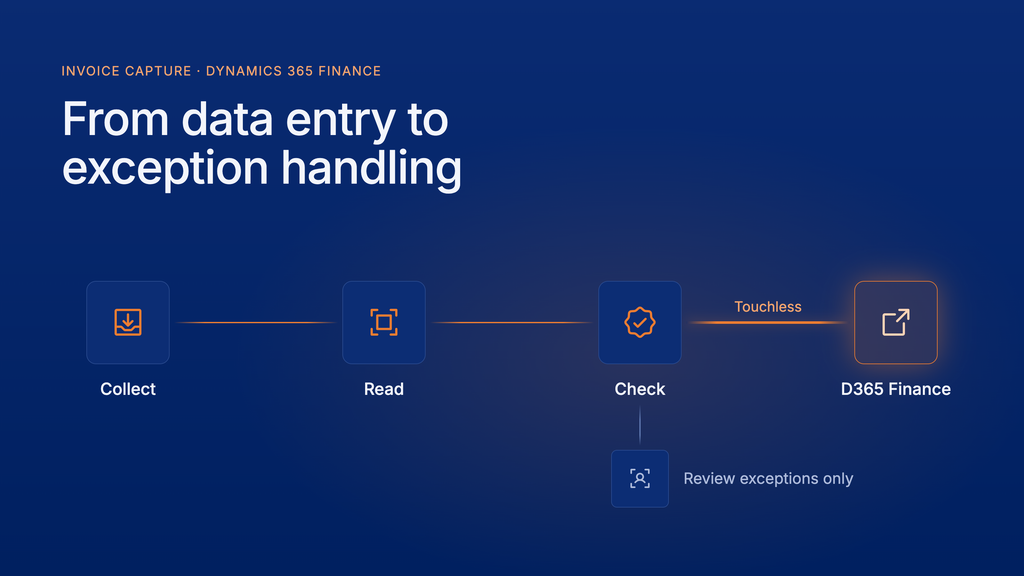
This is the shift from data entry to exception handling, and it is where AP teams see the biggest gains.
Invoice Capture for Dynamics 365 Finance
Invoice Capture is Microsoft’s OCR solution built for Dynamics 365 Finance. It runs on the Power Platform, using AI Builder to read invoices, Power Automate to collect them, and Dataverse to store them. It then sends clean, checked invoices straight into Dynamics 365 Finance. Here is how it covers the full journey.
1. Collect invoices in one place
Channels gather invoices from the sources your suppliers already use. Ready made templates cover Outlook, shared mailboxes, SharePoint, and OneDrive, and clerks can also upload up to 20 files at a time. File filters check size, type (PDF, PNG, JPG, and TIFF), and file name, so files that are not invoices are set aside for review. Channels can also be linked to a legal entity, so each invoice goes to the right team from the start.
2. Read the invoice with AI
The prebuilt invoice model handles the most common layouts in many languages. For complex or unusual invoices, you can train a custom model with as few as five sample invoices and capture extra fields your business needs.
3. Fill in the gaps automatically
Invoice Capture works out the key details needed to create an invoice in Dynamics 365 Finance:
- Legal entity and vendor account, matched from names, addresses, and tax numbers
- Item number or expense type for each line
- Currency code, taken from the purchase order or vendor record
- Purchase order number, reformatted to match your own numbering rules
4. Check before anything is posted
Built in validation checks for missing mandatory fields, low confidence results, and records that do not exist in Dynamics 365 Finance. It also confirms that line amounts, charges, discounts, and tax add up to the invoice total. Credit notes can be spotted by their title, with amounts and quantities switched to negative for you.
5. Review only what needs attention
When an invoice does need a person, the side by side viewer shows the original document next to the captured data. Clicking a field highlights where it came from on the page, and each error sits right next to the field it relates to. Clerks can link invoice lines to purchase order lines, add charges and tax, and fix values from live lookup lists.
6. Get smarter with every invoice
Continuous learning records the choices your team makes once an invoice is transferred. The next invoice from that vendor benefits automatically, including the right legal entity, vendor, items, charge codes, date format, and decimal format. Fewer invoices need a manual touch over time.
7. Transfer to Dynamics 365 Finance
Invoices can be sent as pending vendor invoices or invoice journals, together with the original file as an attachment. PO invoices, header only invoices, and cost invoices are all supported, and cost invoices can carry financial dimensions such as business unit, department, and cost center to route approvals. If you set manual review to apply only when errors occur, clean invoices move through with no human touch at all.
8. Stay in control
Configuration groups let you set different rules by vendor, legal entity, or system level. Role based security keeps clerks focused on the invoices they own. A dashboard shows volumes, top vendors, days to complete, and invoices still pending, so AP managers can spot bottlenecks early.
The business value in plain terms
| AP challenge | How Invoice Capture helps | Business result |
| Invoices arrive through many sources | Channels collect email, SharePoint, OneDrive, and uploads in one list | Nothing gets lost |
| Manual data entry | AI reads and fills in invoice fields | Hours saved every week |
| Errors in totals and PO numbers | Automatic checks and PO formatting | Fewer corrections at period close |
| Slow approvals | Clean invoices flow straight to Dynamics 365 Finance, with financial dimensions for routing | Faster payment and better use of early payment discounts |
| Every vendor looks different | Continuous learning and custom models | Accuracy that improves over time |
| Limited visibility | Dashboard and status tracking | Clear view of workload and bottlenecks |
The bigger win is people. When routine invoices process on their own, your AP team can spend its time on supplier relationships, cash planning, and the exceptions that really matter.
How Reach helps you get there
The technology is ready, but the value comes from setting it up the right way for your business. Reach brings deep Dynamics 365 Finance and AP automation experience to every step:
- Readiness and setup. We prepare your Power Platform environment, enable the right features, and assign the correct security roles.
- Channel design. We connect your mailboxes, SharePoint sites, and folders so every invoice lands in the right place.
- Rules that fit your process. We shape configuration groups, validation rules, and review conditions to raise your touchless rate.
- Custom models and fields. When the prebuilt model is not enough, we train custom models and extend Dynamics 365 Finance to carry extra fields and financial dimensions.
- Adoption and support. We train your AP team and help you measure results through the dashboard.
Ready to move AP from data entry to real value?
Your AP team should not spend its week copying numbers. Whether you need a quick assessment of your current process, a fast move to Dynamics 365 Finance with Rapid F&O, help switching on AI-powered Invoice Capture, or a partner to keep it all running smoothly, Reach has a service that fits where you are today.
Get in touch with Reach to talk through your invoice process and see Invoice Capture in action. We will help you find the right first step, and the fastest route to touchless invoices.
Frequently asked questions
OCR turns printed or scanned invoices into digital data. In AP, AI powered OCR reads key fields like invoice number, vendor, lines, tax, and totals, then fills them into your finance system so clerks do not have to type them.
It is Microsoft’s OCR solution built for Dynamics 365 Finance. It uses AI Builder, Power Automate, and Dataverse to collect, read, and check invoices, then transfers them to Finance as pending vendor invoices or invoice journals.
No. The prebuilt model reads common layouts in many languages without templates. For unusual invoices, a custom model can be trained with as few as five samples.
Yes. If you set manual review to apply only when errors occur, clean invoices that pass all checks go straight into Dynamics 365 Finance.
Continuous learning records the corrections your team makes. The next invoice from the same vendor uses those choices automatically, including vendor, items, charge codes, and date format.

Principal at Reach
Radovan Miodragovic is a Dynamics 365 Technical Solution Architect and Team Lead in Reach with over 17 years of experience in delivering complex technical solutions. A solution-oriented leader, he specializes in the architectural design, development, and implementation of Microsoft Dynamics 365 for Finance and Operations, alongside expertise in Azure, Power Platform, and DevOps. Radovan holds a Master of Science in Electronics Engineering and carries an extensive list of industry credentials, including the Dynamics 365: Finance and Operations Apps Solution Architect Expert certification.