
Reach’s Principal Nash took part in a SCORE webinar in August called Working with AI: Tools, Agents, and Strategies That Deliver Results for SMB Owners. Nash volunteered with SCORE to share what Reach has learned while helping businesses get real, measurable value out of AI, not just interesting demos.
The goal was simple: help small business owners move from random AI experiments to repeatable business value.
Why this matters now
Most small businesses have already tried AI in some form. The problem is not access to tools; it is that AI use tends to stay scattered. One person writes a good email with it, another asks it a random question, and nothing gets reused or improved. During the session, one attendee summed up the frustration well, saying their team had “a dozen good prompts living in a dozen different inboxes.” Nash used that comment as a jumping-off point to show a better path.
The tool map
Nash walked through how Reach uses three tools every day, and where each one earns its place.
- Copilot is strongest when the work already lives in Microsoft 365, things like files, email, Teams, meetings, SharePoint, and business apps.
- Claude is Reach’s go-to for structured thinking, documentation, SOPs, and high-quality written work
- ChatGPT is great for fast exploration, brainstorming, and quick rewrites.
The real unlock is not picking the right tool. It is building repeatable patterns a team trusts and reuses for Reach’s own team, that turned about half a day of documentation work into roughly an hour.
A simple way to think about AI maturity
Nash walked attendees through four stages of AI proficiency that apply to individuals and to whole organizations.
- Explorer: trying prompts for writing and brainstorming, with no shared standards yet
- Operator: using reusable prompt patterns and knowing how to give good context
- Builder: creating repeatable workflows, checklists, templates, and light automation
- Leader: setting standards, reviewing risk, coaching others, and measuring value.
Most businesses can move up a level in a matter of weeks, not years, once they focus on patterns instead of one-off prompts.
A prompt pattern anyone can use
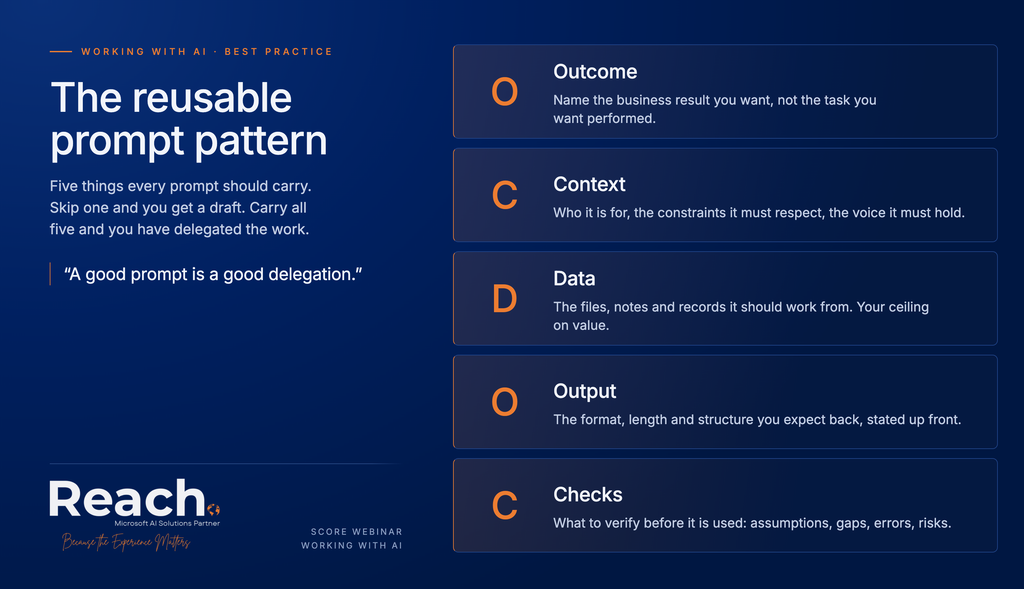
One of the most requested takeaways from the session was Reach’s simple prompt framework, OCDOC:
- Outcome: what result do you actually want?
- Context: what background does the AI need?
- Data: what information should it use?
- Output: what format or structure do you want back?
- Checks: what should be reviewed before you trust the result?
As Nash put it during the session, a good prompt is a good delegation.
Data and systems set the ceiling
AI can only be as good as what it can see. If data is scattered across inboxes and desktops, AI stays a decent writing assistant at best. If systems are connected and permissions are clean, AI can start to summarize, compare, recommend, and even trigger work across the business. Before buying more tools, it is worth cleaning up the basics: key documents, customer data, SOPs, permissions, owners, and systems of record.
Where to start
Nash shared practical, real-world examples from the session across common SMB functions. Here is a taste of what came up:
- Customer inquiries: drafting first response emails from a shared library of tone and policy notes, so replies stay fast and consistent no matter who is answering
- Quoting: turning a rough scope of work into a clean, formatted quote in minutes instead of starting from a blank template each time
- Hiring: writing job posts and first-pass candidate summaries from resumes, so a hiring manager spends time on decisions instead of formatting
- Sales: prepping call notes into a short recap and next steps email right after a meeting ends
- Finance: turning a messy expense export into a clean summary a business owner can actually read.
In every case, the pattern is the same: start small with an Explorer level task, build it into an Operator level pattern, then turn it into a Builder level template or workflow.
A simple 30-day plan
For anyone ready to get started, here is the path Reach recommends:
- Week 1: Pick two use cases, one executive and one operational
- Week 2: Create reusable prompt patterns and capture what works
- Week 3: Clean up inputs, files, and permissions
- Week 4: Pilot the workflow with a small group and measure time saved, quality, and adoption.
Get the checklist
To make this easier to act on, Reach put together a free downloadable checklist based on the four stages Nash covered in the session: Beginner to Expert AI Readiness. It breaks each stage down into specific, doable steps so a team can see exactly where they stand today and what to try next.

Stop letting AI readiness slow you down.
Reach can help you build a resilient, future-ready system.
Thank you, SCORE
Reach is grateful to SCORE for the chance to share this with the small business community. Helping SMB owners get practical, trustworthy value from AI is work Reach cares about, and Reach looks forward to more sessions like this.
Have a question about where your team fits on the Explorer to Leader path? Reach out to Reach and let’s talk it through.