
Microsoft is moving Power Platform past its two original app building methods, canvas apps and model driven apps, into a new generation built around artificial intelligence. New tools called generative pages and code apps let you describe an app in plain language and then open the real code underneath for your developers to shape. The result is faster delivery, more control for technical teams, and a fresh set of questions about governance and cost that Reach helps businesses answer.
This shift matches where the wider market is heading. Gartner projects that 75 percent of new enterprise applications will be built with low-code tools by the end of 2026, up from 40 percent in 2021, as demand for faster delivery pulls more non-technical staff into app building (InfoWorld, reporting Gartner). Microsoft reports that Power Platform has passed 56 million monthly active users, with more than 3 million agents built in its 2025 fiscal year and a 60 percent higher success rate for people building apps with Copilot (Microsoft Power Platform blog, August 2025).
Why Microsoft is widening Power Platform right now
Microsoft has been pushing Power Platform outward for some time. Finance and Operations workloads are moving onto it, and new environment controls make it easier to manage many solutions across a large organization at once.
None of that is the real headline. The bigger shift is happening at the application layer, where Microsoft is handing builders a genuinely new way to create software, not just a faster version of the two ways that came before.
From canvas and model driven apps to a new generation
For years, Power Platform offered two main ways to build an app. Canvas apps give you a flexible, drag and drop surface with a limited set of controls you can extend. Model driven apps go deeper, adding plugins and web resources, but still work from a defined template.
Both approaches are strong within their own boundaries. Neither was built to hand a developer the full, open code behind an application, so teams that needed heavier customization often had to step outside Power Platform entirely to get it.
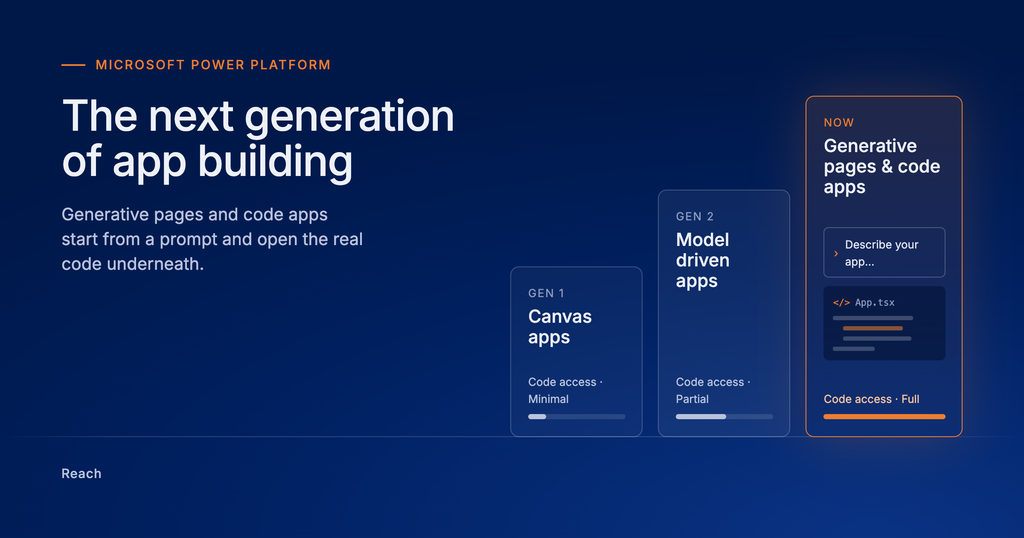
A third category changes that. Generative pages and code apps open a real path to the underlying code, without giving up the platform’s speed or its built-in governance.
| App Type | How Much You Can Customize | Access To The Code | Where Reach Usually Starts |
|---|---|---|---|
| Canvas Apps | Flexible layout, limited set of controls | Minimal | Project assessments and audits |
| Model Driven Apps | Deeper, through plugins and web resources | Partial, built for developers to extend | Rapid Business Central and Rapid Customer Insights |
| Generative Pages and Code Apps | Built from a prompt, then fully open | Full access to the underlying code | AI enablement and managed services |
Inside generative pages and code apps
Generative pages start with a simple prompt. You describe what you need, Microsoft generates a working preview, and you can then open the code behind it and change it by hand. The result connects natively to model driven applications, so it fits straight into solutions you already run on Dynamics 365 or Business Central.
Code apps work the same way in spirit. They hand developers the full application rather than a simplified version of it, while keeping the platform’s data model, security, and connectors underneath.
For business leaders, the practical upside is speed without a hard ceiling. Teams can start with a described idea and finish with code ready for production, instead of having to choose between fast and flexible.
Free today does not mean free forever
During a recent Power Platform briefing, one detail stood out. New capabilities like generative pages are currently free while in preview, a common pattern as Microsoft drives early adoption of a new feature.
That pattern is worth planning around rather than reacting to later. Preview pricing tends to shift once a capability reaches general availability, and a feature that looked free in a pilot can carry real licensing and usage costs once it is rolled out across a whole organization.
This is exactly where a proper assessment pays for itself. Reach project assessments and audits review what you are building, how it is likely to be licensed, and whether your current Dynamics 365 or Power Platform setup is ready to take it on, before cost or governance gaps become a surprise.
Talk to Reach about your next step
Power Platform is changing quickly, and the businesses that benefit most are the ones who plan the move rather than stumble into it. Reach works with organizations across Microsoft Business Central, Dynamics 365 F&O, Customer Insights, and D365 Sales to turn platform change into a system that actually fits how your business works.
Contact Reach today for a project assessment or a conversation about where AI enablement and rapid implementation can take your next build.
Frequently asked questions
Canvas apps use a fixed set of controls that you arrange yourself. The new generation, including generative pages and code apps, starts from a prompt and then opens the underlying code to you, so there is far less of a ceiling on customization.
Microsoft is rolling them out as part of its regular Power Platform updates, and they are built to connect directly with model driven applications. As with any new capability, Reach recommends an assessment before putting one into daily production use across a whole organization.
Features often launch free while in preview, and pricing can change once they reach general availability. Planning licensing and cost now, rather than after rollout, avoids surprises later.
Reach supports the full journey, from project assessments and AI enablement through rapid implementation and ongoing managed services, so a new capability becomes a supported part of your Dynamics 365 or Business Central environment rather than an isolated experiment.
Not directly, but it does affect what your implementation can grow into. A Reach project assessment is a good first step if you want to know whether your current setup is ready to take advantage of these newer tools.

Massimo Lolli is a versatile and accomplished CRM/Power Platform Developer at Reach International, based in Belgrade, Serbia, since May 2024. With a rich history of delivering innovative solutions, he previously served as a Business Consultant at Comtrade System Integration, leveraging his skills on the Power Platform, REST APIs, Microsoft Azure, C#, .NET Core, OpenAI, React.js, and more.