
For most Dynamics 365 Finance and Operations teams moving from Lifecycle Services and TFVC to Power Platform Application Lifecycle Management on Git (PPAC), Microsoft’s own Release Flow is the safest starting point. It keeps a single long running trunk, relies on short lived topic branches, and only cuts a release branch when one is actually needed. That shape matches how X++ compiles and how Tier 1 and Tier 2 environments actually get provisioned.
Why This Matters Right Now
If you’ve spent years on D365 F&O with LCS + TFVC, the mental model was simple: one server branch, one Tier-1 box, one workspace mapping. TFVC enforced this by design — you couldn’t easily run two branches on the same machine, and merges were a controlled, occasional event.
Git doesn’t enforce any of that. It gives you cheap branches, cheap merges, and zero opinions about how your team should use them. That freedom is exactly why teams migrating to PPAC/Git get this decision wrong: they either import a generic web-dev branching model that doesn’t respect X++’s slow compile cycles and shared Tier-1 metadata stores, or they try to recreate the TFVC mental model in Git and end up with something worse than what they left behind.
This post walks through four real options: GitFlow, Microsoft’s Release Flow, GitHub Flow, and Environment Branching (branch-per-environment) – evaluated specifically for F&O consultants building pipelines on PPAC with Git source control.
1. GitFlow Branching
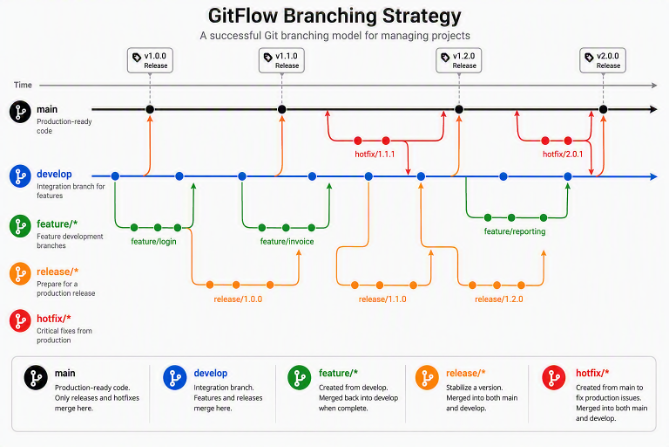
GitFlow branching diagram showing main, develop, feature, release, and hotfix branches
GitFlow is the classic Vincent Driessen model: a permanent main (production-only, tagged releases) and a permanent develop (integration branch), with feature/* branches cut from and merged back into develop, release/* branches cut from develop to stabilize a version, and hotfix/* branches cut from main and merged back into both main and develop.
Why It Fits an F&O/PPAC Migration
- It maps almost directly onto existing Tier-1 model: feature/* for individual developer work on the DEV box, develop as the shared integration branch the DEV box actually compiles, and release/* as the stabilization branch that becomes your single source of truth for deployable packages, matching the “control promotion by controlling what gets merged in”.
- The explicit release/* branch gives X++ builds a stable, frozen target. Full F&O compiles are expensive; having a branch that stops accepting new features while QA works through it means the build pipeline output is deterministic – nobody’s feature branch merge quietly changes what the build server is compiling.
- Hotfixing production doesn’t require touching in-flight release candidates. A hotfix/* branch cut from main lets you patch and redeploy without cherry-picking or coordinating with whatever half-finished features currently sit in develop.
Where It Hurts in Practice
- Merge conflicts don’t disappear — they just get moved to the develop merge step, and in X++ that’s expensive. If develop refactored a shared class while a hotfix touched the same file, you hit a real, sometimes multi-hour, manual reconciliation in metadata XML – not a trivial three-way text merge.
- The single most common GitFlow failure mode is forgetting to merge a hotfix back into develop – the bug silently resurfaces in the next release because nobody remembered the second merge. For a small consulting team without dedicated release engineering, this failure mode is easy to hit more than once.
- Two long-lived integration branches (develop and release/*) are double the branches to keep Tier-1 boxes pointed at correctly — and F&O Tier-1 environments are already a scarce, shared resource. Every extra long-lived branch is another environment slot or another get-latest/recompile cycle your team has to manage.
- It’s heavier than most F&O teams need. GitFlow was designed for products shipping infrequently with long release cycles (desktop software, mobile app store cadences). Most F&O implementations move faster than that once past go-live, and GitFlow’s ceremony (four branch types, two-directional hotfix merges) can slow a small team down more than it protects them.
Bottom line for F&O: GitFlow earns its complexity when you have multiple release trains live at once, or infrequent, high-stakes releases where an explicit stabilization buffer is worth the merge overhead. For a lean, continuously-iterating implementation team, it’s usually more ceremony than the risk profile justifies.
2. Microsoft Release Flow
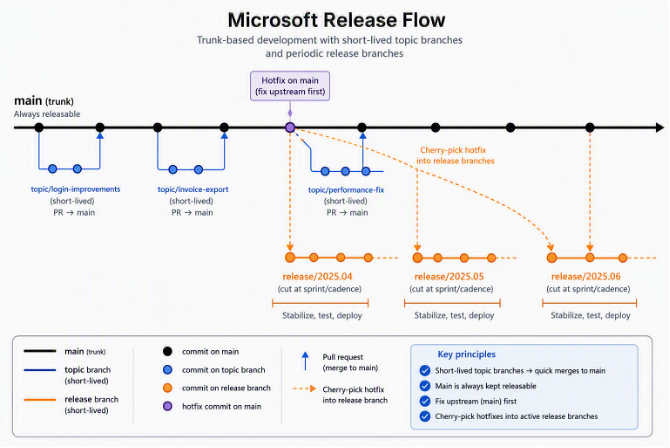
Microsoft Release Flow diagram showing main trunk with topic branches and periodic release branch cuts
Release Flow – the model Microsoft’s own Azure DevOps engineering team documented for how they build Azure DevOps itself – is trunk-based development with periodic release branches. Everyone works off short-lived topic branches merged directly into main; main is always kept releasable. Every sprint (or cadence of your choosing), a release/* branch is cut from main. Hotfixes are fixed on main first, then cherry-picked forward into the live release branch(es) that need them.
Why It Fits an F&O/PPAC Migration
- Only one long-lived integration branch to keep a Tier-1 box synced to. main is the single trunk; release branches are short-lived, deployment-specific artifacts, not places developers work day-to-day. That’s a much lighter operational footprint than GitFlow’s two permanent branches.
- The “fix upstream first” principle removes GitFlow’s #1 failure mode. Because the hotfix lands on main first, it’s structurally guaranteed to be in the next release branch cut – there’s no separate “remember to forward-port” step that can be skipped under incident pressure. Microsoft’s own engineering post is explicit about this being the reason they chose the direction they did.
- Short-lived topic branches minimize X++ merge pain. GitFlow’s biggest weakness in F&O, conflicts surfacing when a long-lived branch finally merges, is far less common here because nothing sits unmerged long enough to diverge significantly from main.
Where It Hurts in Practice
- It only works if main is genuinely kept deploy-safe at all times, which for X++ means real feature-flag discipline or fully-toggleable customizations, not trivial in F&O, where a half-finished form extension or a partially-built data entity can break compilation for everyone else on trunk.
- Cherry-picking is not free, despite the model’s reputation for avoiding GitFlow’s forward-merge problem. If main has diverged significantly from an older, still-live release branch (a common F&O scenario when a client is running last quarter’s release in production while this sprint’s work continues), the cherry-pick can itself conflict, and now you’re resolving the same logical fix twice, once on main and once, differently, on the release branch.
- Multiple parallel release branches multiply hotfix work. If two clients are running two different release branches simultaneously (very plausible for a consultancy serving several F&O clients from shared code), a single hotfix has to be cherry-picked into each live release branch in sequence, the model doesn’t eliminate that cost, it just moves where it happens.
Bottom line for F&O: Release Flow is the leaner, more Git-native choice for most implementation teams, lighter branch inventory, one clear trunk, and a hotfix philosophy that avoids GitFlow’s silent-regression trap. Its main precondition is discipline: main has to stay genuinely releasable, and you need to be honest about how fast your F&O CI actually is before leaning on “fix upstream first” during a production incident.
3. GitHub Flow
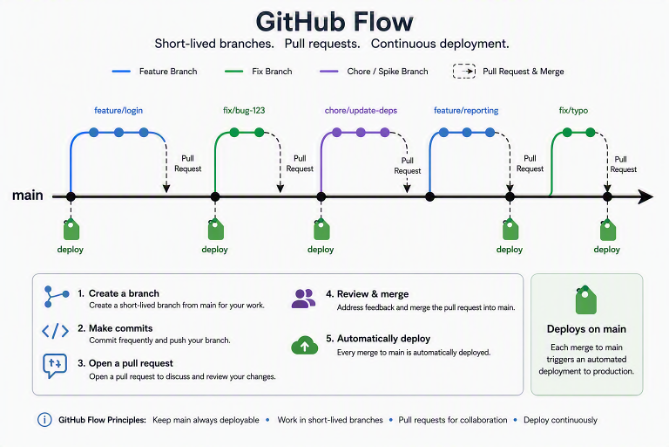
GitHub Flow diagram showing a single main trunk with short-lived feature and fix branches merging back via pull requests, and deploy tags placed directly on main
GitHub Flow is Release Flow’s leaner cousin, arguably the simplest branching model still in mainstream use. There is exactly one long-lived branch: main. Every piece of work, feature or fix, gets a short-lived branch cut from main, goes through a pull request, and merges straight back into main. There are no permanent release/* branches at all: main is deployed directly, with tags marking what shipped when. It’s the model GitHub itself uses for continuous deployment of web services.
Why It’s Tempting for an F&O/PPAC Migration
- It’s the simplest possible mental model for a small consulting team, one branch to keep synced to your DEV Tier-1 box, no second integration branch, no periodic release-branch ceremony. For a team of 3-5 developers, this is genuinely appealing overhead-wise.
- It pairs naturally with PPAC’s disposable-environment philosophy. Because there’s no separate release branch holding state, spinning up a fresh Tier-1/Tier-2 environment from main at any commit is trivial and always reproducible, there’s only ever one branch’s history to reason about.
- PR-gated merges into main give you the same code-review checkpoint Release Flow relies on, without needing to also manage a release/* branch lifecycle on top of it.
Why It Doesn’t Actually Fit F&O
- It assumes continuous deployment straight to production, and F&O simply doesn’t work that way. GitHub Flow’s whole premise is “every merge to main is deployable and gets deployed”, fine for a SaaS web app behind a load balancer, but F&O promotion is a gated, multi-environment process (DEV → Test/UAT (Tier 2) → PROD (Tier 2/3)), often with client sign-off between each hop. There’s no equivalent of “just deploy main again” when a Tier 2 UAT box requires a scheduled deployable-package import and a business sign-off before PROD.
- Without a release branch, there’s no stable target for QA to test against while development continues. The moment a second feature merges into main while QA is still validating the first, the environment QA is testing against has silently moved, there’s no frozen candidate. Release Flow’s periodic release-branch cut solves exactly this; GitHub Flow deliberately doesn’t have one.
- It offers no clean mechanism for holding back an approved-but-not-yet-released change while shipping others, which is a routine F&O consultant scenario (feature A is client-approved to go to PROD this cycle, feature B is still in UAT). With only one branch and no release cut, you’re back to reverting individual commits on main to manage what’s “live,” which is fragile.
- It has no answer for hotfixing an older, already-deployed state. If PROD is running last month’s package while main has since moved on with unrelated changes, GitHub Flow has no release branch to hotfix in isolation, you’d have to reconstruct the old state from tags and improvise a patch branch, which the model was never designed around.
Bottom line for F&O: GitHub Flow is best understood as what you get when you strip Release Flow down past the point F&O’s gated, multi-environment promotion model can support. It’s excellent for continuously-deployed web services with a single production target, but F&O’s Tier 2/3 approval gates and the routine need to freeze a stable release candidate for QA make the missing release-branch concept a real gap, not just unnecessary ceremony.
4. Environment Branching (Branch-per-Environment) — the Tempting Trap
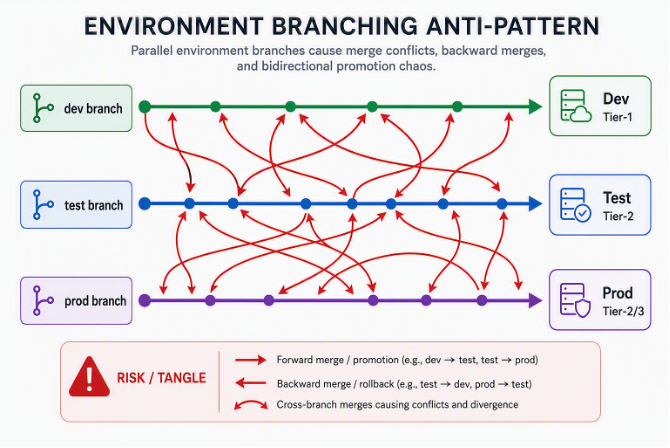
Environment branching diagram showing dev, test, and prod branches each mapped to a fixed environment, with tangled forward and backward merge arrows
This is the strategy every team migrating from TFVC reaches for first, and the one this post exists to talk you out of, at least in its naive form.
The pattern: create one long-lived branch per environment, dev-branch, test-branch, prod-branch, and permanently bind each to its matching Tier-1/Tier-2 box. Promotion means merging forward, branch to branch, in lockstep with environment promotion: dev-branch → test-branch → prod-branch.
Why It Looks Like the Obvious Choice at First Sight
If you’re coming straight from TFVC, this is muscle memory. TFVC’s whole model was branch-per-environment: $/Trunk/Dev, $/Trunk/Test, $/Trunk/Prod, each mapped to a workspace on a specific box. Recreating that same shape in Git feels safe, it’s the devil you know, it requires no new mental model for the team, and on a whiteboard it looks identical to what already worked for years.
Why It’s Actually a Bad Strategy in Git — the Technical Reasons
- It inverts what branches are for. In Git, a branch is meant to represent a unit of work (a feature, a release candidate) that eventually merges and is retired. An environment is a deployment target, not a unit of work. Binding a branch permanently to an environment means the branch never gets to “finish”, it lives forever, accumulating drift, which is precisely the opposite of how Git branches are designed to be used. TFVC could get away with this because it had no cheap branching or merging model to begin with; Git punishes the pattern specifically because it’s optimized for the opposite workflow.
- Promotion isn’t actually one merge — it’s three, and they all fight each other. As the diagram above shows, once test-branch gets a bug fix directly (because a tester needed something patched right there), that fix has to flow both forward into prod-branch and backward into dev-branch, or it’s silently lost the next time dev-branch is promoted forward and overwrites it. Every environment-level branch becomes both a source and a target of merges going in two directions, and X++ metadata conflicts compound with every one of those crossing arrows.
- It reintroduces the exact TFVC pain PPAC/Git is supposed to remove. The whole point of the Git model is version-pinned, explicit, reproducible builds, not “whatever happens to be sitting in the environment’s branch today.” Branch-per-environment quietly recreates “the branch’s state is undocumented and machine-specific,” just with Git syntax instead of tf.exe.
- It has no answer for partial promotion. F&O teams routinely need to advance 2 of 3 completed features to QA while holding the third back. With environment branching, there’s no clean unit to hold back, you either merge the whole dev-branch forward (dragging the unfinished feature with it) or you manually revert commits after the fact.
- Long-lived environment branches diverge permanently, not temporarily. Feature branches in GitFlow or Release Flow are temporary, they exist to converge and then disappear. Environment branches never converge with each other by design (dev is never “done” and merged into prod as a final act), they run in parallel forever, so the divergence and the conflict risk are permanent structural features of the strategy, not a phase you pass through.
- It actively fights PPAC’s environment model. PPAC environments are meant to be disposable and re-creatable from source, spin up a fresh Tier-1 box, point it at a branch, done. Environment branching couples environment identity to branch identity so tightly that recreating an environment means carefully preserving exactly which branch state it held, reintroducing the “which workspace mapping is this again?” confusion that plagued TFVC on shared boxes.
Bottom line for F&O: Environment branching is the strategy that requires the least unlearning from TFVC, and that’s exactly the problem. It optimizes for feeling familiar, not for how Git or PPAC actually work, and it reintroduces bidirectional merge conflict risk and undocumented environment state as permanent features rather than temporary ones. Treat it as a migration anti-pattern, not a starting point.
Quick Comparison
| GitFlow | Microsoft Release Flow | GitHub Flow | Environment Branching | |
| Long-lived branches | 2 (main, develop) | 1 (main) | 1 (main) | 3+ (one per environment) |
| Release branch concept | release/*, cut from develop | release/*, cut from main per sprint | None — main deploys directly | Every environment branch acts as a de facto “release” |
| Hotfix model | Branch from main, merge into both main + develop | Fix on main, cherry-pick into release branch(es) | No isolation — patch main directly, no way to target an older deployed state | Ad hoc — patched directly on whichever environment branch needs it |
| #1 failure mode | Forgetting the hotfix→develop merge | Cherry-pick conflicts when main has diverged from a live release | No frozen candidate for QA; the test target moves under them mid-cycle | Bidirectional drift; forward promotion silently overwrites environment-only fixes |
| Partial promotion (2 of 3 features) | Supported via selective merge into release/* | Supported via selective merge into main | Not supported — no release cut to selectively promote into | Not supported cleanly — no unit smaller than the whole branch |
| Tier-1 box mapping overhead | Higher (2 permanent branches to track) | Lower (1 trunk + short-lived releases) | Lowest (1 branch, ever) | Deceptively low upfront, high long-term (branch = environment forever) |
| Assumes gated, multi-environment promotion? | Yes | Yes | No — assumes continuous deploy to one target | Yes, but implements it in the riskiest possible way |
| Best fit | Multiple release trains, infrequent high-stakes releases | Lean teams, continuous delivery, strong feature-flag discipline | Single-environment continuous deployment (not F&O’s model) | Nowhere — avoid for Git/PPAC migrations |
Recommendation: Choose by Context, Not by Default
No single strategy fits every D365 F&O team. Choose the simplest model that supports your release cadence, QA process, hotfix needs, and active versions.
- Microsoft Release Flow suits teams with one primary delivery stream, regular releases, and a deploy-safe main branch.
- GitFlow suits multiple release trains, longer stabilization periods, or several supported versions.
- GitHub Flow suits simple projects with one current version and rapid deployment, but rarely matches F&O’s gated promotion process.
- Environment Branching should be avoided as a permanent model because it creates branch drift and complicates selective promotion.
Add branching complexity only when a clear delivery or support requirement justifies it.