
Maintenance usually gets attention when something stops working. A production line slows down, a forklift is unavailable, a pump fails, or a facility system needs urgent service. Suddenly maintenance isn’t just a technical activity, it’s a business priority. Dynamics 365 Asset Management in Finance & Operations helps organizations manage that reality with more structure, visibility, and control, right inside the same ERP system where inventory, procurement, finance, and production already live.
What It Actually Does
At its core, Dynamics 365 Asset Management helps answer everyday questions: What assets do we have, and where are they? What work is requested, planned, or overdue? Which spare parts do we need? What did the work cost? Which assets keep failing, or are becoming too expensive to maintain?
Think of it as the operational memory of your equipment – it knows what you own, what’s happened to it, what needs to happen next, and what it costs to keep running.
A Few Concepts Worth Knowing
A little vocabulary goes a long way here, without turning this into documentation:
- Assets are the physical things worth tracking – machines, forklifts, pumps, HVAC units, vehicles.
- Functional locations are essentially an asset’s business address – Plant 01, Line 3, Warehouse Zone B — so the business knows where equipment lives, even when it moves.
- Asset types group similar equipment (all forklifts, all conveyors) so maintenance can be standardized instead of reinvented for every unit.
- Asset hierarchy lets assets nest under one another – a packaging line made up of a conveyor, a labeling machine, and a drive motor – which helps isolate exactly where a repeat problem is coming from.
One lightweight technical piece worth mentioning: an Asset BOM is essentially a maintenance shopping list attached to an asset – the belts, filters, bearings, and consumables normally needed to service it. Instead of technicians relying on memory, the parts a job needs are already tied to the asset, which makes planning faster and spare parts more predictable.
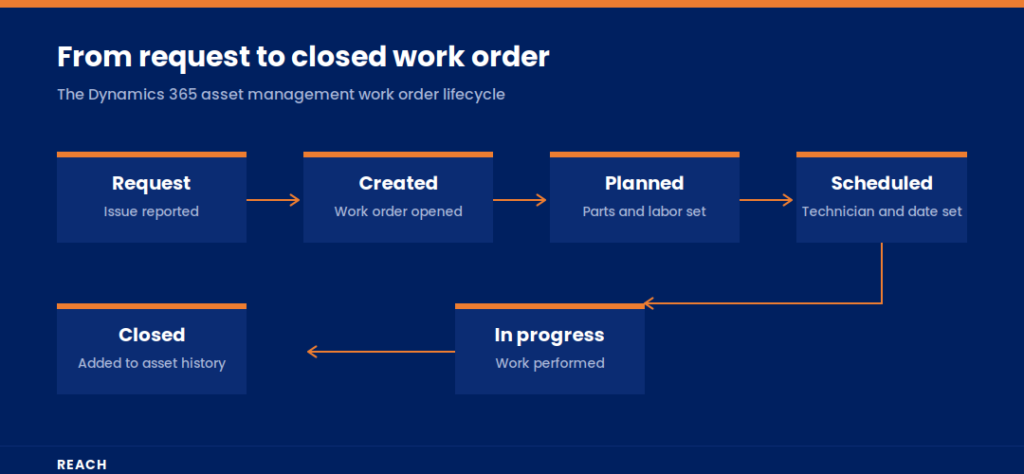
From Request to Closed Work Order
The process typically starts with a maintenance request – someone flagging an issue, like a forklift battery not holding charge or an HVAC unit leaking water. If it needs planned action, that request becomes a work order: the document that defines what needs to be done, on which asset, by whom, with which parts, and at what cost.
Work orders move through a lifecycle – created, planned, scheduled, in progress, completed, closed – which is a small but useful technical detail, because it clarifies who owns the next step and prevents work from being marked “done” before it actually is. Every closed work order adds to the asset’s history, so the next time something goes wrong, the team isn’t starting from scratch.
Corrective, Preventive, and (Eventually) Predictive
Most organizations deal with some mix of three maintenance styles:
- Corrective maintenance – fixing something after it fails. Necessary, but if most of your work is corrective, the business is probably reacting too much.
- Preventive maintenance – planned work done before failure, based on time (monthly inspections), usage (every 1,000 operating hours), or business rules. It’s the equivalent of servicing your car before it complains — not glamorous, but usually cheaper than a breakdown.
- Predictive maintenance – using condition data or measurement trends to plan work before a failure shows up. Most organizations mature into this over time, once they have reliable data and monitoring in place; it’s not usually a starting point.
Counters (operating hours, mileage, production cycles) are what make usage-based maintenance possible — two identical pumps running very different hours don’t need to be serviced on the same fixed calendar.
Where the Connections Pay Off
Dynamics 365 Asset Management is most valuable because it doesn’t sit in isolation. Spare parts can be reserved from inventory before a technician arrives. Work that needs an outside vendor or a purchased part can flow into procurement instead of becoming an informal, last-minute buy. And because labor, parts, and services get captured on the work order, finance gets a real picture of what an asset costs to maintain, sometimes enough to justify replacing a machine instead of continuing to repair it.
A Quick Example
A manufacturer that used to take maintenance requests over the phone and on sticky notes now has supervisors submitting structured requests, planners prioritizing and scheduling the work, technicians recording what was actually done, and managers reviewing asset history to spot repeat problems – like three machines all failing from the same worn bearing, pointing to a lubrication or supplier issue worth investigating.
Getting Started Without Overbuilding It
A few practices tend to separate the implementations that stick from the ones that don’t:
- Start with critical assets, not the entire equipment list.
- Keep the asset hierarchy simple enough that people actually use it.
- Define priorities clearly – if everything is “urgent,” nothing is.
- Connect spare parts (and Asset BOMs, where they add real value) early, since planning without parts just moves the delay elsewhere.
- Make sure technicians close work orders with real notes and fault details – skipping this quietly drains the value out of your asset history.
- Review preventive plans periodically; if an asset is serviced monthly and never has issues, the frequency may be too high.
Final Takeaway
Dynamics 365 Asset Management brings structure to something every asset-heavy business already does: keep equipment running. The real value isn’t the work order itself – it’s the visibility, the planning, the cost control, and the better decisions that come from maintenance history the business can actually trust. Start with what matters most, keep the process usable, and let it mature from there.
Ready to get more from Dynamics 365 Finance and Operations?
Whether you are planning a new implementation, migrating from an aging ERP system, or trying to get your current setup back on track, Reach can help. Our Dynamics 365 Finance and Operations approach is built to reduce risk, shorten timelines, and get your finance and operations teams working with data they can trust.
Talk to Reach today about an implementation, migration, or project assessment, and find out what a smoother path to Dynamics 365 F&O looks like for your business.
It helps answer everyday questions about equipment: what assets a business owns, where they are, what work is requested or overdue, which spare parts are needed, what past work cost, and which assets keep failing or are becoming too expensive to maintain. It works inside the same system as inventory, procurement, finance, and production, so information flows between them naturally.
An asset hierarchy lets assets nest under one another. For example, a packaging line might be made up of a conveyor, a labeling machine, and a drive motor. This helps teams pinpoint exactly where a repeat problem is coming from.
An Asset BOM is essentially a maintenance shopping list tied to a specific asset. It lists the belts, filters, bearings, and consumables normally needed to service that unit. Instead of technicians relying on memory, the parts a job needs are already connected to the asset, which makes planning faster and spare parts easier to predict.
It typically starts as a maintenance request, such as someone flagging a forklift battery that will not hold a charge. If action is needed, that request becomes a work order defining what needs to be done, on which asset, by whom, with which parts, and at what cost. The work order then moves through stages: created, planned, scheduled, in progress, completed, and closed. This builds a clear history for future reference.
Corrective maintenance means fixing something after it fails. Preventive maintenance means doing planned work before failure, based on time, usage, or business rules, similar to servicing a car before it breaks down. Predictive maintenance uses condition data or trends to plan work before a failure even shows signs. Most organizations start with corrective and preventive work, then grow into predictive maintenance once reliable data is in place.

Junior Microsoft Dynamics 365 developer with a solid foundation in delivering maintainable, business-oriented solutions. Adept at supporting requirements analysis, implementing and testing customizations, and collaborating with cross-functional teams to improve system functionality. Demonstrates strong attention to detail, a professional approach to communication, and a commitment to continuous learning and best practices.