
How an AI Agent Turns Operational Systems into Decision-Ready Outputs
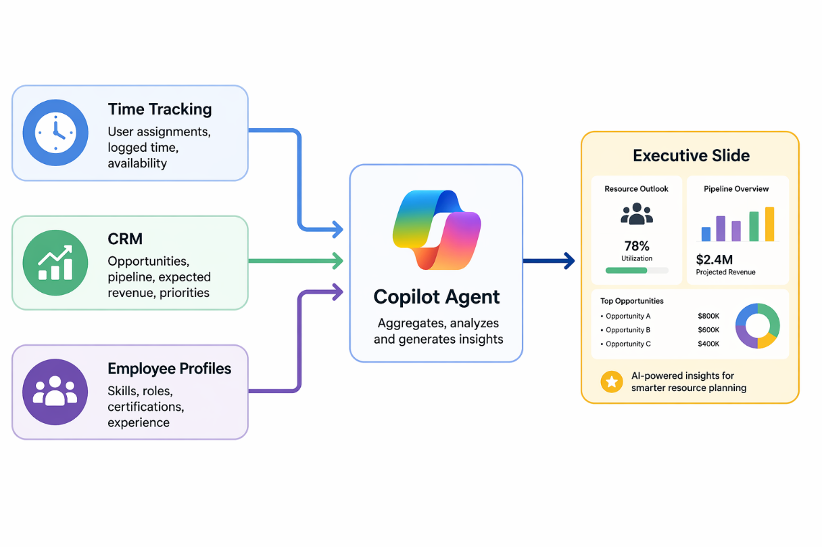
What if Copilot studio could do more than answer your questions? What if it could pull staffing signals from your time-tracking tool, read open opportunities from your CRM, gather employee profiles from a third system, and then turn all of that into a polished executive PowerPoint slide, ready for the leadership meeting?
That was the idea behind this project. Not just another AI assistant that surfaces information when asked. But an agent that takes scattered operational intelligence and packages it into a format decision-makers already trust: a presentation.
This post walks through the thinking, the design decisions, and most importantly, who this kind of agent actually helps and why it matters beyond the technology.
The Problem Worth Solving with Copilot Studio
Most companies today are not short on data. Somewhere in your organization, there is a system tracking who is working on what, another tracking incoming business opportunities, and yet another storing employee skills and profiles. The information is there.
The gap is not between data and insight – it is between insight and action.
Decision-makers do not run on dashboards or raw reports. They run on presentations: a one-pager for a leadership review, a pipeline slide shared before a planning meeting, a clean visual that someone prepared the night before. And that preparation work – pulling numbers, building tables, formatting slides – falls on a person every single time.
That is the friction point this agent was built to remove.
| The real challenge in enterprise AI is not intelligence. It is the last mile: delivering insight in the format the business already uses. |
Meet the Agent
The agent was built inside Copilot Studio and operates as a resource planning assistant. When triggered, either automatically or by a user request, it connects to three separate operational systems:
- Time Tracking System: retrieves current team assignments, availability windows, and workload distribution across project weeks.
- CRM / Opportunity Data: reads open opportunities from the pipeline, including deal stages, values, probabilities, and associated accounts.
- Employee Profiles & Skills: pulls profile data for team members, including their competencies and current engagement status.
From there, the agent does not just return raw data. It applies business logic: it calculates team load by week, identifies underloaded employees, and matches those employees to open opportunities based on skills alignment and confidence thresholds.
The result is a deterministic report: structured, consistent, and repeatable, that summarises who is available, what work is coming, and who could realistically be staffed to it.
But that was only step one.
The Output That Changes Everything
A chat report is useful. A downloadable PowerPoint slide is transformational.
That was the pivotal design decision in this project. Rather than stopping at presenting results inside the conversation, the agent was extended to generate a single-slide executive summary – a fully formatted .pptx file that users can download instantly and share in any meeting.
The slide follows a fixed Expansion Pipeline layout:
- A main title and a reporting period subtitle
- Three KPI boxes: Total Pipeline Value, Active Opportunities, and In Proposal Stage
- An opportunity table showing each deal with its account, value, stage, probability, and matched employees
The choice of a single-slide format was deliberate. It is easier to automate reliably, easier for executives to absorb quickly, and purpose-built for leadership updates rather than general-purpose document generation.
This shift, from an agent that reports to an agent that produces, is what makes the whole initiative business-relevant. It answers a question that many AI projects fail to ask:
Before and After: The Real Impact
The best way to understand the value of this agent is to compare the two worlds side by side.
| Before: The Manual Way | After: With the AI Agent |
| Manually pulling data from multiple systems | Agent retrieves data automatically on demand |
| Hours spent building slides from scratch | Polished executive slide generated instantly |
| Insights locked in spreadsheets or reports | Insights packaged in a shareable .pptx file |
| Inconsistent formatting across presentations | Fixed visual template ensures brand consistency |
| Bottleneck: one person who knows where the data is | Any team member can trigger the report |
Who Actually Benefits From This?
Technology is only as valuable as the people it serves. Before asking how this agent works, the more important question is: who wakes up every Monday morning with the problem it solves?
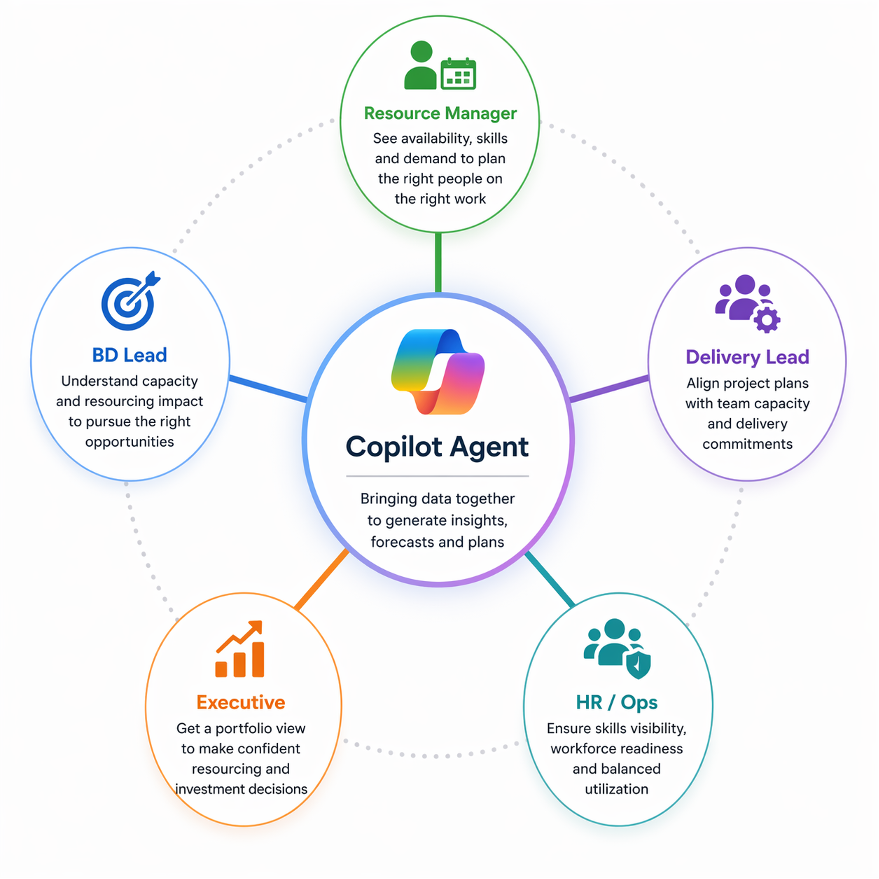
The answer is broader than it might first appear. This agent does not serve one role; it sits at the intersection of several, and each of those roles experiences the value differently.
| Resource Managers The people responsible for knowing who is available, who is overloaded, and where the gaps are. – Spend significant time each week manually checking assignment tools and asking team leads for updates. – Benefit from an automated summary that already knows who is available and by how much, no chasing required. – The agent surfaces capacity proactively, in a format they can act on without any additional preparation. |
| Business Development & Sales Leads The people who own the opportunity pipeline and need to know whether the team can actually deliver on what is being sold. – Often operate without clear visibility into whether delivery capacity exists to support an incoming deal. – With the agent, pipeline opportunities are automatically matched against available employees – before a commitment is made. – The executive slide gives them a credible, shareable artifact to bring into pre-sales and planning conversations. |
| Project & Delivery Leads The people managing active engagements who need to plan transitions, anticipate gaps, and flag risks early. – Typically manage availability planning informally, through spreadsheets or verbal check-ins. – Gain a clear, consistent view of upcoming team load (weeks in advance) so transitions can be planned rather than reacted to. – Can use the generated slide directly in status meetings without any additional formatting work. |
| Executive Leadership & Directors The people who review business performance, approve resourcing decisions, and set strategic priorities. – Do not have time to interpret raw data or read through structured system reports. – Receive a polished, single-slide pipeline summary they can download, circulate, and present without asking anyone to prepare it. – Decisions that previously required a preparation meeting can now be made from a single shared file. |
| Operations & HR Teams The people who track skills, maintain employee profiles, and support workforce planning. – Often holds rich profile data stored in systems that nobody outside their team routinely consults. – The agent brings that data into the planning workflow, surfacing skill matches automatically rather than waiting to be asked. – Visibility into how employee capabilities align with incoming opportunities supports better hiring and capacity planning discussions. |
| The agent does not replace any of these roles. It removes the repetitive, manual layer that slows all of them down, freeing each person to focus on the judgment and decisions that actually require a human. |
Why Constraints Make AI Smarter
One of the most counterintuitive insights from building this agent is that narrowing the space of what it is allowed to do often produces better results dramatically.
It is natural to assume that a more capable, more autonomous agent is always better. But in enterprise contexts, that assumption breaks down quickly. Business automation is not a creative exercise; it has rules, formats, and expectations, and deviating from them even slightly can produce output that is technically generated but practically useless.
The design principle that made the biggest difference was treating the PowerPoint template as a fixed contract: keep the layout, keep the table structure, update the text, and nothing else. Every boundary added made the output more reliable. Every time the agent was given more freedom than it needed, the results became less trustworthy.
This is a principle worth carrying into any AI initiative:
| The best AI results in business automation often come not from giving the agent more power, but from giving it a more precise target. |
The Bigger Picture: AI as a Translation Layer
Step back from the technical details for a moment, and what this agent actually represents becomes clearer.
It is a translation layer.
On one side are operational systems: time tracking, CRM, and employee databases, that hold data in formats designed for machines and administrators. On the other side are the people who make decisions: managers, directors, and leadership teams who work from presentations, briefings, and summaries.
The gap between those two sides is where most enterprise AI initiatives get stuck. They produce insight that lives in a dashboard no executive ever opens, or a report format that requires a developer to interpret.
This agent bridges that gap. It takes:
- Raw assignments and availability data
- Open opportunity records with values and probabilities
- Employee profiles and skills
And it turns them into a clean summary, a polished slide, and a reusable artifact for decision-making, all in a single step.
That is not just automation. That is decision acceleration.
| What the agent takes in Raw team assignments Open CRM opportunities Employee skills & profiles Business matching rules | What the agent produces A structured planning report Staffing candidate matches Pipeline coverage summary A boardroom-ready .pptx file |
What This Means for Enterprise Teams
This kind of agent is not a prototype. It is a pattern. And it is one that most organizations are positioned to replicate with the tools they already have.
If your team tracks time and assignments in any structured system, if your business runs opportunities through a CRM, and if your employees have profiles with documented skills, then the core data model is already there. The gap is not the data. It is the workflow that connects it to output.
Copilot Studio, combined with the right integrations and a carefully scoped output template, closes that gap without requiring a large custom development effort.
The agent described here is proof that enterprise AI is most valuable not when it adds new intelligence to a process, but when it removes unnecessary human labor from a process that already works, specifically, the labor of translating system data into human-readable decisions.
| The real promise of enterprise AI is not answering questions. It is packaging insight into the formats that decision-makers already trust. |
Final Thoughts
What makes this agent worth building, and worth writing about, is not the technology itself. Copilot Studio, CRM integrations, and time-tracking APIs are tools that many organizations already have access to.
What makes it worth building is who it serves and what it removes from their day. A resource manager who no longer spends Monday morning pulling data from three systems. A sales lead who can walk into a client meeting with a staffing-ready pipeline summary. A director who receives a boardroom-ready slide without asking anyone to prepare it.
The agent does one thing, in one consistent format, reliably – and that is exactly what business automation is supposed to do.
If your organization already tracks time, manages opportunities, and maintains employee profiles, the foundation is already there. The question is not whether AI can help with resource planning. It is simply: how soon can you close the gap between the data you already have and the decisions that are still being made without it?
Ready to Close the Gap Between Your Data and Your Decisions?
If your organization is already tracking time, managing a pipeline, and maintaining employee profiles, you have everything you need to build an agent like this one. What’s missing isn’t the data. It’s the workflow that turns it into something your leadership team can actually use.
At Reach, we help enterprise teams design and build AI agents that do more than answer questions; agents that plug into the systems you already run and produce the outputs your business already trusts, from executive slides to staffing reports to pipeline summaries.

Stop chasing data across five systems by hand.
Reach can help you build Copilot Studio agents that turn operational data into boardroom-ready outputs, from day one.

Junior Microsoft Dynamics 365 developer with a solid foundation in delivering maintainable, business-oriented solutions. Adept at supporting requirements analysis, implementing and testing customizations, and collaborating with cross-functional teams to improve system functionality. Demonstrates strong attention to detail, a professional approach to communication, and a commitment to continuous learning and best practices.