
If your procurement team spends its day forwarding emails, chasing purchase order confirmations, and updating vendor records on someone else’s behalf, the fix is not more headcount. It is giving vendors a secure, self service door directly into your ERP. Dynamics 365 Finance and Operations includes a vendor collaboration portal that lets suppliers confirm purchase orders, respond to RFQs, submit invoices, and update their own contact and banking details, all without a single person on your team acting as the go between. Access is governed the whole time by the same Microsoft Entra security engine that protects every other user in your system, so opening the door does not mean losing control of it.
This is not a small efficiency gain. McKinsey’s research into procurement operations found that spend managed per procurement employee is now roughly 50 percent higher than it was five years ago, and separately estimates that AI enabled copilots and automation tools can cut time spent on routine procurement activities by 25 to 40 percent. Vendor self service is one of the clearest, lowest risk ways to capture that time back, because it removes the manual relay step entirely instead of just making the relay faster.
The Hidden Cost of Being the Middle Person
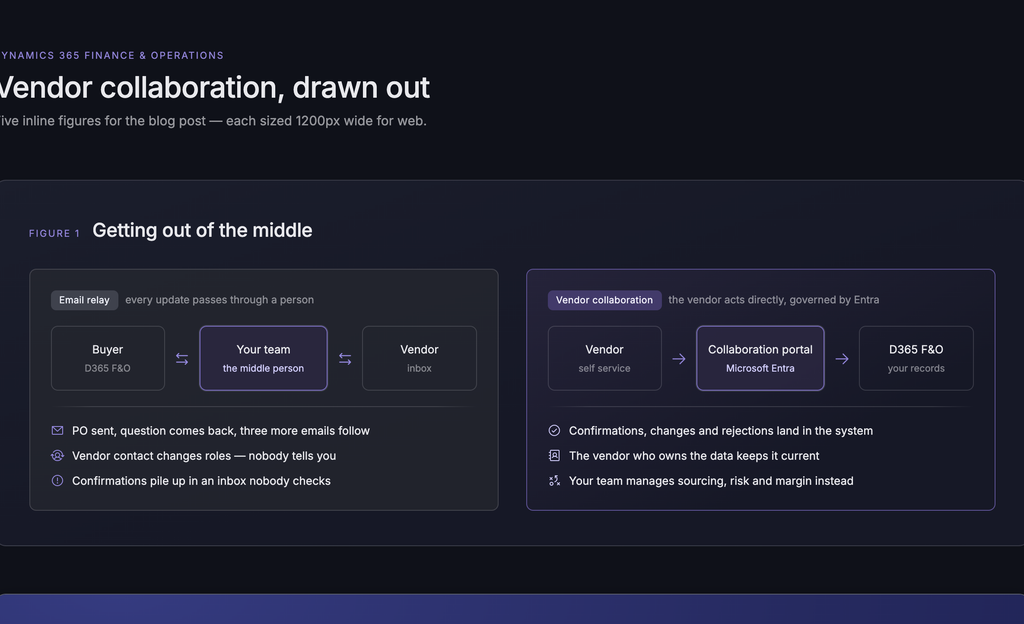
Picture the typical cycle. Someone on your team emails a purchase order. The vendor replies with a question, or three. There is back and forth. A contact at the vendor changes roles and nobody tells you, so confirmations pile up in an inbox nobody is checking. Every single update, no matter how small, has to pass through one of your people first.
That is not procurement work. That is message relaying, and it is exactly where things get missed.
A vendor collaboration model flips the story. The vendor logs in, sees their own orders, updates their own information, and confirms directly. Your team stops relaying and starts actually managing the relationship. The pattern shows up consistently in the data:
- Manual, email based procurement hides costs in errors, missed confirmations, and compliance gaps that are hard to see until they show up as a late shipment or a wrong price
- Organizations that adopt structured, self service procurement tools see meaningfully lower processing costs, because the review happens once, by the right person, instead of repeatedly through email threads
- Every hour a buyer spends confirming a routine order is an hour not spent on sourcing strategy, supplier risk, or the categories that actually move margin.
What Vendor Self Service Actually Looks Like Inside Dynamics 365
Turning a vendor on for collaboration is a single dropdown, not a project. From the vendor record, you choose whether the vendor is inactive, active with purchase orders that still require your review after confirmation, or active with purchase orders that auto confirm once the vendor accepts. Both models are supported, so the setting matches your standard operating procedure rather than forcing a workaround.
From there, adding a contact is straightforward. If the person already exists in your system, Dynamics 365 recognizes them and pulls in their details. If not, you create the record, click Provision Vendor User, and assign a role:
- Admin role, which lets the vendor’s own staff add further contacts and request access for colleagues without coming back to your team every time
- Collaborative role, which covers day-to-day work such as responding to inquiries, reviewing documents, and acting on purchase orders.
Every provisioning request runs through an approval workflow, not a shortcut. The system checks whether the person is new or existing, routes the request for internal approval, creates the Microsoft Entra invitation, and only then activates access on the Dynamics 365 side. Nothing is granted until every step is complete, and the whole process is summarized automatically so an approver can see exactly what they are signing off on.
Security Is the Feature, Not the Tradeoff
The most common objection to opening any part of an ERP to outside users is security, and it is a fair one. The answer here is that vendor collaboration does not bypass your identity and access controls, it runs through them. Every provisioned vendor user is created and governed through Microsoft Entra, the same engine that secures your internal team, with role based access limiting each person to exactly the areas of the system they need. A vendor contact with the collaborative role can see and act on their own purchase orders, documents, and invoices. They cannot see anyone else’s.
For organizations weighing whether to open this kind of access at all, this is usually where a structured assessment earns its cost. Reach’s project assessments and audits are built for exactly this decision, mapping which vendors, roles, and workflows should be enabled before anything goes live, so the rollout matches your actual risk tolerance rather than a generic default.
Purchase Orders, RFQs, and Invoicing Without the Inbox
Once a vendor is active, the collaboration extends across the full procurement cycle, not just confirmations.
Purchase orders. Vendors see every PO tied to their account, organized by status: draft, in review, open, received, or invoiced. When a buyer sends a PO for confirmation, the vendor can accept it outright, reject it with feedback such as a pricing issue, or propose changes to terms like delivery timing. Every change is visible to both sides, so nothing gets resolved in a side email thread that your system never sees.
RFQ and bidding. The same portal supports full RFQ and RFP cycles. Vendors can review attachments, complete questionnaires, respond to delivery and payment terms, and either submit a counter proposal or decline. It is a structured negotiation inside your ERP instead of a scattered set of email chains with different vendors on different timelines.
Invoicing. Vendors create invoices directly against approved purchase orders, with header and line level data pulled in automatically. Draft, approved, and paid invoices are all visible in one place, cutting down the “where is my payment” emails that eat up AP time on both sides.
Vendor maintained records. Beyond transactions, vendors can maintain their own addresses, contacts, tax identification, certifications, and banking details, with supporting documents attached where needed. That means the certification your team needs to confirm before awarding a contract is already current, because the vendor who owns that data keeps it current.
Watch the Vendor Collaboration DEMO
Why This Is Bigger Than a Procurement Convenience
The theme running through all of this is one that shows up across every Microsoft Business Applications project Reach delivers: the value of an ERP investment is rarely about the software alone. It is about how much manual, error prone human effort still sits between the system and the people who touch it every day. Vendor collaboration removes one of the largest sources of that friction inside Finance and Operations, and it is exactly the kind of high impact, low disruption improvement organizations often miss during their original implementation because attention was focused elsewhere.
That is where Reach fits. Whether your F&O environment was deployed years ago and never fully configured for vendor self service, or you are planning a new rollout and want it built in from day one, Reach’s Rapid F&O methodology and managed services bring this capability online without a lengthy re implementation. For organizations dealing with an underperforming or troubled deployment, Reach’s ERP rescue and recovery projects can also fold vendor collaboration into a broader stabilization plan, and Reach’s AI enablement work extends naturally into this space as Copilot generated summaries and workflow automation continue to reduce manual review even further.
Frequently Asked Questions
No. Vendors only see the specific purchase orders, invoices, and records tied to their own account. Access is controlled through role based security in Microsoft Entra, the same framework used for internal users.
Yes. Each vendor can be set to require internal review after they confirm a PO, or to auto confirm once they accept, depending on your standard operating procedure.
No. Vendors log in through a secure web portal using the credentials created during provisioning. There is no separate application to install.
Enabling a vendor account itself takes a single setting change. Provisioning an individual contact runs through an approval workflow, typically completed within the same business day depending on your internal approval steps.
See It Running Against Your Own Vendors
The fastest way to know whether this fits your procurement process is to watch it work against your own data, with your IT and procurement teams in the room. Reach will walk through vendor enablement, provisioning, PO confirmation, RFQ collaboration, and invoicing using a setup that mirrors your environment, not a generic demo.
Contact Reach to book a walkthrough and find out how much of your team’s day is currently spent relaying messages that a vendor could handle themselves.

Marketing and Sales Lead at Reach
Dan Kosanovic is a Market Leader and Dynamics 365 Expert at Reach International with extensive experience in strategic business development and client relationship management. He specializes in developing innovative marketing strategies that drive brand visibility and revenue growth. Dan successfully manages complex projects while leveraging cutting-edge technologies to optimize business processes. Dan is passionate about exploring new opportunities to help organizations improve their systems and processes through strategic partnerships and technological innovation.