
Prompt columns went generally available on 4 May, and they are the rare Dataverse feature that removes work rather than adding another place to configure things. You write a natural language prompt, point it at columns on the table, and an AI model fills the column. The value is stored in the row like any other, ready for forms, views, flows, and Power BI. Up to five per table, powered by GPT-4.1 mini (or any other available model), no plugin and no flow.
That is the shift. We have been able to call a model from Dataverse for years. What we could not do was keep the answer where the data lives without building something to carry it there.
What I built: Deal Signal
To find out whether the feature earns its place, I gave the Opportunity table a health score. One prompt column, Deal Signal, reads the stage, revenue, close date, probability, description, and the linked notes and activities, then scores the deal from 0 to 100 and explains itself.
You are a sales operations analyst reviewing one opportunity record.
Use only the information supplied below. Never invent names, dates, numbers or competitors.
Opportunity: {Topic}
Sales stage: {Sales Stage}
Estimated revenue: {Est. Revenue}
Estimated close date: {Est. Close Date}
Probability: {Probability}
Created on: {Created On}
Description: {Description}
Notes and activities: {notes and activities}
Score the health of this deal from 0 to 100, where 100 means very likely to close
on time. Weigh these factors:
1. How recently the customer was actually contacted
2. Whether a budget holder has been named
3. Whether the close date is realistic for the current stage
4. Whether a competitor is mentioned
5. Whether a next step is agreed and dated
Return only valid JSON, no code fences, no commentary:
{
“score”: 0,
“band”: “Healthy | Watch | At risk”,
“headline”: “one sentence, 15 words or fewer”,
“positives”: [“up to 3 short points”],
“risks”: [“up to 3 short points”],
“confidence”: “High | Medium | Low”
}
If a factor cannot be judged, leave it out rather than guessing and set
confidence to Low.
Each line in the field list carries an input column, added in the prompt with Add content.
Two things in that prompt matter, and neither is the scoring. The first is the instruction to use only the supplied information and to set confidence to Low when a factor cannot be judged. Without it, you get confident scores built on nothing, which is worse than no score at all.
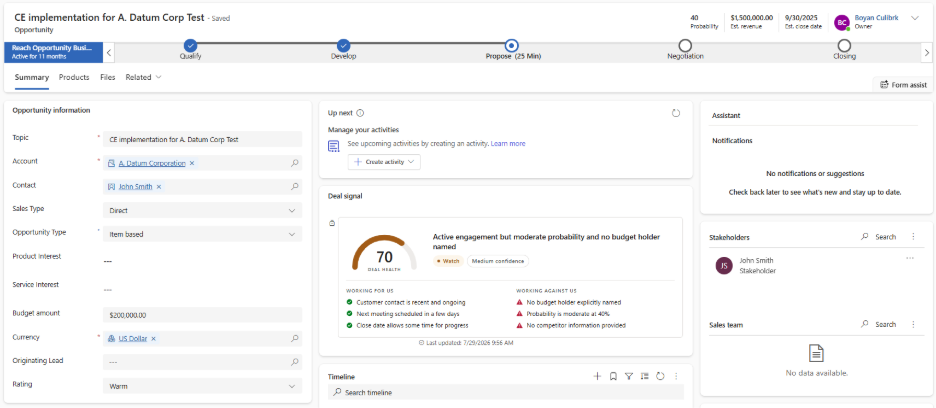
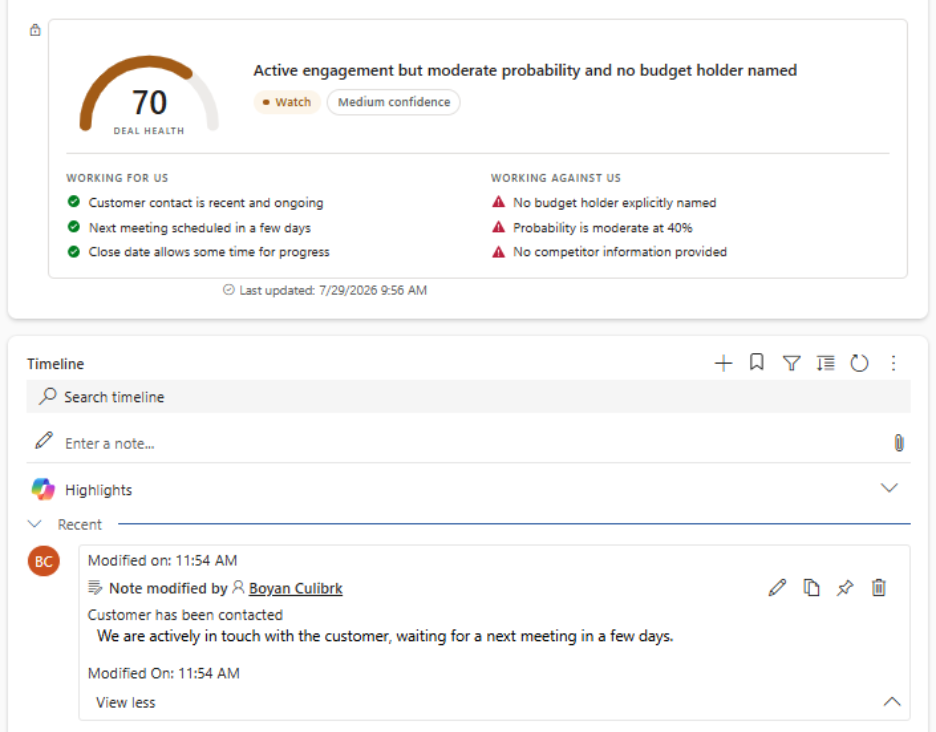
The second is the output format. Asking for JSON turns the column from a paragraph a human has to read into a payload a component can render. I bound a PCF control to the column that parses the value and draws an arc gauge, the headline, and two short lists. One opportunity came back at 25, band At risk, confidence Low, flagging no budget holder and no recent contact. The seller sees a gauge. The column still holds text.
Structured output is the real unlock
A JSON blob is invisible to everything Dataverse is good at. You cannot sort a view by it, chart it, or use it in Power BI. So the second half of the pattern is a small flow that parses the value into typed columns: a whole number score, a choice for the band, a text headline. Once those exist, at-risk deals over 100k closing this quarter become a view, and the health distribution becomes a dashboard. That is the part sales managers care about.
When they run, and when they do not
This is where a proof of concept meets reality. A prompt column runs when a record is created, or when one of the columns named in the prompt definition is updated. Nothing else triggers it.
Existing records are not backfilled. On-demand execution is not supported. Editing the prompt does not recalculate anything already generated. And here is the one that will catch you: adding a note does not touch a column on the opportunity, so the signal does not refresh. Your score can sit there looking confident while three new notes say the deal has died.
The fix is a helper column. Add something like Signal Requested On to the opportunity, include it in the prompt definition, and stamp it from a ribbon button. That counts as an input update, so you get a working Refresh button and a way to force a run after you change the prompt.
The parts that make it usable in production
Execution is asynchronous, so it never blocks a save, but the form also has no idea a value is coming. Filter conditions are the credit control lever: point them at open opportunities above a value threshold and the prompt skips the rest. Every prompt column also gets Status and Details columns automatically, tracking NotStarted, InProgress, Completed and Failed with the error text. Put Status on a view before you demo anything.
Where to start
Three concrete moves. First, pick one table where a person currently reads free text and forms a judgement, because that is the shape of problem this fits. Second, make your first prompt return JSON even if you render it as plain text today, since adding structure later means reprocessing every record. Third, decide up front how the column gets refreshed. The trigger rules will shape your design more than the prompt will.
The interesting part was never the score. It is that the score lives in the row.
Frequently asked questions
They are a column type where a natural language prompt, combined with existing columns on a table, is used to generate an AI value that is stored directly in the record. No plugin or separate flow is required to move the result into place.
Up to five prompt columns per table, and they are powered by GPT 4.1 mini by default, with other available models supported.
No. A prompt column only runs when its record is created or when one of the columns named directly in the prompt definition is updated. Related records, such as notes or activities, do not trigger a refresh unless you build a helper column to force one.
Not natively. The common workaround is a helper column, such as a date stamp field, added to the prompt definition and updated from a button. That input change triggers a fresh run.
Let us build this into your environment
Prompt columns are a genuine step forward for Dataverse, but the gap between a working demo and a governed, production-ready field is real, and it shows up fastest in the trigger rules most teams never read closely. If you are running Dynamics 365 Sales, Customer Insights, or Business Central and want an AI signal that lives where your team already works, Reach can assess your current build, design the prompt and refresh strategy properly the first time, and carry it through to a managed, supported rollout. Contact Reach to talk through what an AI-enabled column could look like on your own tables.

Senior Technical Consultant at Reach
Bojan is a Senior Technical Consultant and certified Microsoft Solution Architect at Reach, where he designs and implements flexible, high-value solutions using Microsoft Power Platform and Dynamics 365. Drawing on broad experience with tools like Azure Logic Apps, Azure Functions, and Power Automate, he combines deep platform knowledge with creativity to solve complex problems for clients.