
Introduction
Here’s something that gets lost in ERP feature comparisons: your ERP doesn’t exist in isolation. It’s one part of a technology ecosystem that includes productivity tools, analytics platforms, automation capabilities, and increasingly, artificial intelligence.
When you choose an ERP, you’re also choosing an ecosystem. And this is where Microsoft’s Power Platform and Copilot create advantages that Oracle, SAP, NetSuite, and Sage simply can’t match for most investment managers.
Let me explain why this matters more than another consolidation feature comparison ever could.

The Ecosystem Reality: Why Choice Matters
Recent data from Gartner and McKinsey suggests that the “ecosystem effect” is the primary driver of digital transformation success in 2025 and 2026.
- The Integration Barrier: A 2025 Gartner survey found that 47% of CFOs cite integration challenges as the single biggest barrier to automation. When your ERP is disconnected from your email and spreadsheets, you pay a “manual tax” every day.
- The Strategic Delta: According to McKinsey, finance teams that operate within a unified technology platform spend 20% to 30% less time crunching data, allowing them to reallocate that effort toward alpha-generating strategies.
- Platform Optimism: Gartner reports that 67% of finance leaders are more optimistic about AI in 2025 than they were last year—but this optimism is highest among those whose AI is embedded into their existing workflows rather than bolted on.
The Ecosystem Reality
Walk through any investment management firm and count the Microsoft products you see:
- Outlook for email and calendaring
- Excel for analysis, modeling, and half your actual work
- Word for documents and reports
- Teams for communication and collaboration
- SharePoint for document management
- PowerPoint for investor presentations and board decks
- OneDrive for file storage.
Most investment managers are already Microsoft shops. The question isn’t whether to use Microsoft products. It’s whether your ERP works with them or against them.
When your ERP is D365 Finance, these aren’t integrations you need to build or maintain. They’re native connections that work out of the box.
Excel Integration That Actually Works
Every ERP claims Excel integration. Most mean you can export data to Excel. D365 Finance means something different:
- Open any grid in D365 Finance directly in Excel
- Edit data in Excel and publish back to the system with validation
- Build Excel templates that pull live data and refresh on demand
- Design journal entry templates in Excel that accountants actually want to use
- Create financial reports in Excel that connect directly to the ledger.
For investment managers where Excel is the native language of finance, this isn’t a nice-to-have. It’s how work actually gets done.
Teams as Your Work Hub
D365 Finance embeds directly in Microsoft Teams:
- Approve workflows without leaving Teams
- Get notifications on transactions requiring attention
- Access financial data through conversational interfaces
- Collaborate on documents attached to transactions
- Hold discussions linked to specific records.
Your finance team already lives in Teams. With D365 Finance, they don’t have to leave to do their ERP work.
Investment managers drown in documents: investment memos, compliance records, audit support, contracts, and invoices. D365 Finance connects to SharePoint for document management:
- Attach documents to any transaction
- Apply SharePoint retention policies to financial records
- Search documents alongside transaction data
- Maintain compliance with document governance requirements.
No separate document management system. No manual filing. Documents live where they belong, connected to the transactions they support.
Power Platform: The Low-Code Accelerator
Power Platform is Microsoft’s low-code development environment. It includes Power Apps, Power Automate, Power BI, and Power Pages. For investment managers, it’s transformative.
Power BI for Financial Analytics
Yes, you can connect any BI tool to any database. But Power BI and D365 Finance were built to work together:
- Pre-built content packs for common financial analytics
- Direct query against D365 Finance data without extraction
- Embedded analytics within D365 Finance workspaces
- Natural language queries against financial data
- Automatic refresh without building data pipelines.
Investment managers need analytics beyond standard reports: AUM trends, fee analysis, boutique profitability, expense ratios, and regulatory metrics. Power BI delivers this without a separate data warehouse project.
Power Automate for Process Automation
Investment management has countless manual processes that should be automated:
- When an invoice exceeds $50,000, notify the CFO
- When a new vendor is created, trigger compliance review workflow
- When month-end close completes, distribute financial packages to boutique heads
- When bank reconciliation has unmatched items over 3 days old, escalate
- When a journal entry posts to certain accounts, alert compliance team.
Power Automate connects D365 Finance to hundreds of other applications and services. Build these automations without code, maintain them without developers.
Power Apps for Custom Solutions
Every investment manager has unique processes that don’t fit standard ERP functionality:
- Investment committee approval workflows
- Regulatory filing tracking
- Compliance attestation collection
- Custom fee calculation interfaces
- Investor reporting portals.
Power Apps lets you build custom applications that read and write D365 Finance data without traditional development projects. Finance teams can create their own solutions or work with citizen developers rather than waiting in IT backlogs.
Dataverse as the Foundation
Underlying Power Platform is Dataverse, Microsoft’s data platform. D365 Finance data flows into Dataverse, making it available to:
- Power Platform applications
- Third-party integrations
- Custom reporting solutions
- AI and machine learning models.
This common data layer eliminates the integration spaghetti that plagues multi-vendor ERP environments.
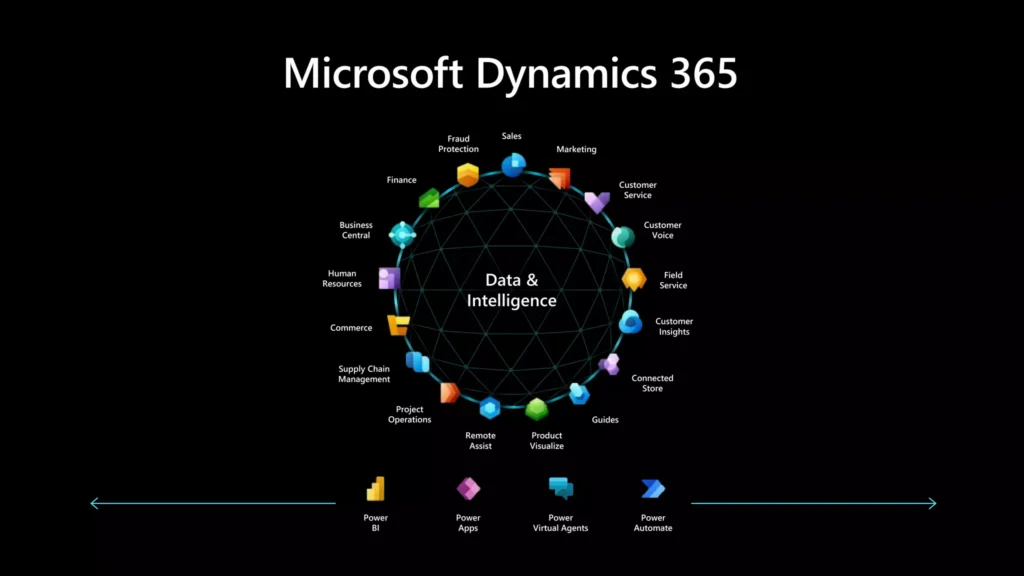
Copilot: AI That Actually Helps Finance Teams
Microsoft Copilot brings generative AI to the entire Microsoft ecosystem, including D365 Finance. This isn’t futuristic speculation. It’s available now and evolving rapidly.
Copilot in D365 Finance
Finance-specific Copilot capabilities include:
- Natural language queries: Ask “What were our largest expenses last quarter by boutique?” and get answers without building reports
- Anomaly detection: Copilot identifies unusual transactions, variances from budget, or patterns that warrant investigation
- Cash flow forecasting: AI-powered predictions of cash position based on historical patterns and open transactions
- Collection recommendations: Prioritize collection activities based on customer payment behavior analysis
- Journal entry assistance: Describe what you need to record and Copilot suggests the appropriate entries
- Bank reconciliation matching: AI-assisted matching of bank transactions to system records.
Copilot Across the Ecosystem
Because Copilot works across Microsoft 365, capabilities compound:
- In Excel: Analyze financial data exports with natural language, generate formulas, create visualizations
- In Outlook: Draft responses to vendor inquiries with context from D365 Finance records
- In Teams: Summarize finance team discussions, extract action items, prepare meeting notes
- In Word: Generate financial narrative for board packages using actual data
- In PowerPoint: Create investor presentation slides with current financial metrics.
The Compounding Effect
Here’s what Oracle, SAP, NetSuite, and Sage can’t replicate: the compounding effect of AI that works across your entire work environment.
When you use Oracle and Microsoft 365, Copilot in Word doesn’t know your Oracle data. When you use SAP and try to automate processes, you’re building custom integrations. When you use NetSuite and want AI-powered analytics, you’re buying third-party tools.
With D365 Finance and the Microsoft ecosystem, AI capabilities multiply across every application you use. The CFO asking Copilot to “summarize our cash position and draft an update for the board” gets an answer that pulls from D365 Finance, incorporates context from recent Teams discussions, and produces a Word document ready for review.
Security and Compliance Across the Platform
Investment managers can’t sacrifice security for convenience. Microsoft’s platform delivers both:
Unified Identity: Azure Active Directory (now Microsoft Entra ID) provides single sign-on across D365 Finance, Microsoft 365, and Power Platform. One identity to manage, one set of access policies, one audit trail.
Consistent Security: Microsoft’s security capabilities apply across the platform. Data loss prevention policies that protect sensitive data in SharePoint also protect it in D365 Finance. Conditional access rules that require MFA for remote access apply everywhere.
Compliance Certifications: Microsoft maintains SOC 1, SOC 2, ISO 27001, and dozens of other certifications across the platform. You’re not stitching together compliance documentation from multiple vendors.
Information Protection: Microsoft Purview information protection labels can classify and protect financial data across the platform. Sensitive financial reports maintain their protection whether they’re in D365 Finance, SharePoint, or attached to an email.
The Integration Tax You Avoid
When you choose a non-Microsoft ERP, you pay an integration tax:
- Build and maintain connections between ERP and Microsoft 365
- License middleware or integration platforms
- Manage data synchronization and handle failures
- Deal with feature gaps when vendors don’t keep pace with Microsoft’s release cadence
- Train users on different interfaces and experiences.
This integration tax compounds over time. Every Microsoft enhancement requires evaluation and potentially new integration work. Every ERP upgrade risks breaking existing integrations.
With D365 Finance, Microsoft handles this integration. Features work together because they’re built to work together.
Real-World Impact
What does platform integration mean in practice for investment managers?
Faster Close: Accountants work in Excel with live D365 data. Approvals happen in Teams without context switching. Reconciliations complete faster with AI assistance. Month-end close that took 15 days drops to 8.
Better Analysis: Power BI dashboards show real-time boutique profitability. Copilot answers ad-hoc questions instantly. Finance becomes a strategic partner rather than a reporting factory.
Reduced Risk: Consistent security policies across all data. Audit trails that span the entire platform. Compliance controls that don’t depend on manual processes.
Lower Total Cost: No middleware licenses. Fewer integration development hours. Reduced training burden when tools share common interfaces. IT resources focused on value-add rather than integration maintenance.
The Strategic Question
When evaluating ERPs, the typical approach compares features: consolidation capabilities, currency handling, reporting options. These matter, but they’re table stakes among enterprise ERPs.
The strategic question is different: Which platform positions us best for the next decade?
Technology is moving toward:
- AI assistance embedded in every workflow
- Low-code development that empowers business users
- Connected experiences across all applications
- Platform ecosystems that multiply capabilities.
Microsoft is further along this path than any ERP competitor. D365 Finance isn’t just an ERP. It’s your entry point to a platform that will continue evolving with AI, automation, and integration capabilities that standalone ERPs can’t match.
Conclusion
Feature-by-feature ERP comparisons miss the bigger picture. Your ERP choice is an ecosystem choice.
For investment managers already using Microsoft 365, Power Platform, and Azure services, D365 Finance unlocks platform capabilities that create genuine competitive advantage. Copilot AI, Power Automate workflows, Power BI analytics, and seamless integration with the tools your team already uses daily add up to more than any feature checklist can capture.
Oracle has cloud capabilities. SAP has AI initiatives. NetSuite has integrations. But none of them can deliver a unified platform experience where your ERP, productivity tools, analytics, automation, and AI work together as a coherent whole.
That’s the Microsoft platform advantage, and it’s why D365 Finance is increasingly the choice for investment managers thinking about the next decade, not just the next quarter.
Ready to Modernize Your Finance Operations?
Don’t let legacy systems and manual spreadsheets hold back your firm’s growth. Whether you are managing 10 entities or 100, our Finance and Supply Chain Management services are designed to help investment managers unlock the full potential of Microsoft Dynamics 365.
How We Can Help:
- Custom Implementation: Transition from manual processes to an automated, multi-entity environment tailored to PE and investment boutique needs.
- Consolidation Strategy: Design a “single source of truth” for real-time reporting across all fund families and jurisdictions.
- Managed Services: Ongoing support to ensure your system evolves alongside changing regulatory requirements and new fund launches.
Next in this series: Blog 7: The Real Cost of ERP Workarounds.