
The $1.2 Million Mistake
A mortgage lender budgets $500K for an ERP mortgage replacement. Four months later, they’re live.
Except they’re not really live. Month-end close still takes 12 days. The warehouse lender wants reports the system can’t produce. Loan officers are screaming because their commission statements are wrong. And the CFO is manually running Excel macros to close the books.
Eight months and $1.2M later, they finally have a working system. But it cost 2.4x the budget, took twice as long, and nearly lost them their warehouse line when they couldn’t produce required reports.
What happened? They treated an ERP transition like a software upgrade instead of a business overhaul.
If a company is running ABM, Harland Financial, Fiserv, or another legacy platform, the signs are usually clear that it’s time to modernize. The real question isn’t whether to replace it. It’s whether to do it right or do it twice.
Why CFOs Get Burned
The demo looks great. Microsoft Dynamics has dashboards, real-time reporting, and automated workflows. It’s compelling.
Here’s what the demo doesn’t show:
The month-end close process. At most mortgage companies, this looks like:
- Export loan data from the LOS
- Import it into the current ERP
- Run 15 manual reports
- Copy data into Excel
- Make journal entries for things the system can’t handle
- Reconcile warehouse lines manually
- Hope everything ties out
A new system can fix this. But only if someone maps every step of what’s happening now and figures out how the new system should handle it. Miss one step, and the team is still in Excel hell, just with a newer logo on the login screen.
Investor accounting. Many mortgage shops have:
- 8-12 investor relationships
- Different accounting requirements for each one
- Loan sale accounting that happens in spreadsheets
- Gain-on-sale calculations done manually
- Warehouse line reconciliations that take hours
Legacy systems often can’t handle this complexity, so teams build workarounds. Those workarounds are in people’s heads, not documented anywhere. When a company flips the switch on a new ERP without mapping this stuff, it doesn’t magically work. It just breaks in new and exciting ways.
Compliance reporting. HMDA filing. State licensing tracking. Audit trails for examiners. Quality control documentation.
Current systems probably handle 60% of this. The other 40%? Shadow databases. Excel files. Manual tracking. The compliance team has a system, but it’s held together with duct tape.
If the new ERP can’t replicate that 40%, there’s a problem. And the company won’t know until HMDA filing season or the next exam.
The Systems Reaching End of Life (And Why Replacement Is Complex)
Mortgage software solutions, for example, ABM (Affordable Business Management Software) ABM served the industry well for many years, but as mortgage operations have evolved, many companies find themselves outgrowing the platform. The reporting capabilities may not meet modern investor requirements. Integrations often require manual file exports. Accounting teams frequently build Excel infrastructure to fill gaps.
The challenge: all those Excel workarounds represent undocumented process knowledge. When moving to Dynamics, the implementation needs to replicate the actual business logic, not just “what ABM does.”
Homegrown/Custom Systems Some IT teams built custom solutions 10-15 years ago. These systems do exactly what the company needs… until they don’t. The original developer has retired. The code is undocumented. And every time the company wants to change something, it takes months and costs a fortune.
The common thread: All these systems have been “extended” through manual processes, Excel files, and workarounds. Companies don’t have a system anymore, they have a system plus 50 manual processes that make it actually work.
When replacing the system, the implementation needs to replace all of it. And if the manual processes aren’t mapped, the go-live will be rough.
What “Doing It Right” Actually Means
Here’s the framework that separates successful implementations from disasters.
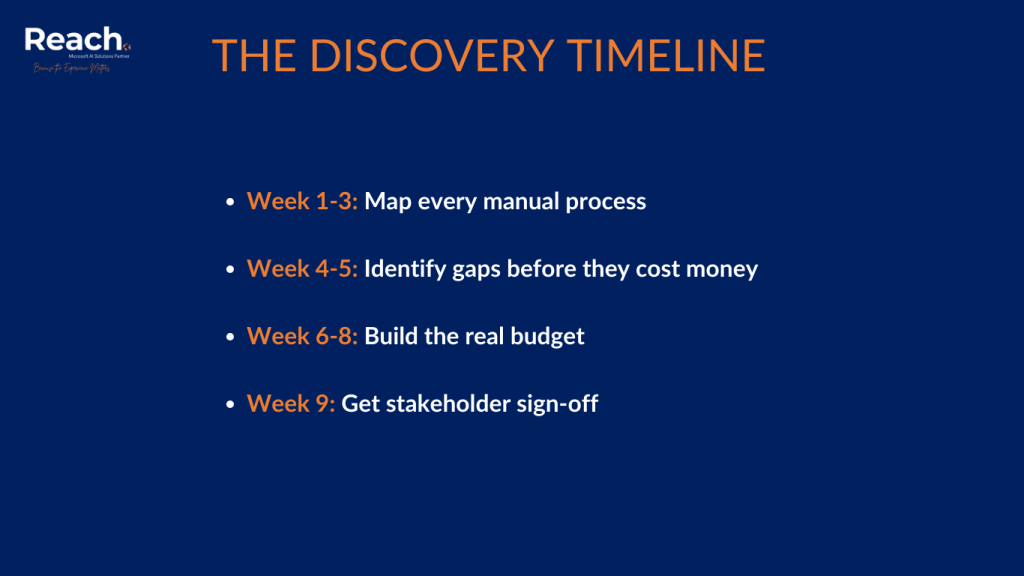
Week 1-3: Talk to Everyone Who Touches Money or Data
Not just the CFO and IT manager. Everyone:
- Controller: Map the month-end close process. Every step. Every manual workaround. Every Excel file. If something happens in a spreadsheet, document why.
- Operations Manager: Walk through a loan from application to investor delivery. Where does data get re-keyed? Where do errors happen? What are the bottlenecks?
- Accounting Team: What takes the most time? Where do bottlenecks occur? What processes would benefit from automation?
- IT Lead: What systems talk to each other? What breaks regularly? What’s held together with custom scripts?
- Compliance Officer: What reports are produced manually? What data lives outside the system? What are the concerns about switching systems?
- HR Manager: How does payroll work? How are commissions calculated? What data comes from where?
- AP/Purchasing Manager: How are vendor payments tracked by loan? How are title fees, appraisals, and credit reports reconciled?
- Sales Management: What do loan officers need to see? What reports do they demand? What drives adoption or resistance?
Week 4-5: Find the Gaps (Before They Cost Money)
Now the team knows what’s happening today. Next question: can Dynamics do it?
Not “does Dynamics have accounts payable?” Obviously it does. The real questions:
- Can it allocate appraisal fees to specific loans automatically?
- Can it generate the warehouse lender report in the exact format they require?
- Can it calculate gain-on-sale by investor with the company’s specific methodology?
- Can it track state licensing by loan officer with renewal dates?
- Can it produce HMDA data in the right format without manual cleanup?
For every “no,” there are decisions to make:
- Build a custom solution (costs money)
- Change the process (costs political capital)
- Keep doing it manually (costs ongoing time)
Figure this out now, not during implementation.
Week 6-8: Build the Real Budget
Now the team can actually estimate what this will cost:
System configuration: $X Custom development: $Y (because some things won’t work out of the box) Integration work: $Z (connecting to LOS, investors, credit bureaus, etc.) Data migration: $A (moving years of history without breaking anything) Training: $B (getting 50 people to use new software) Contingency: $C (because something will go wrong)
Add it up. That’s the real number. If it’s more than initially budgeted, there are three choices:
- Get more budget
- Cut scope
- Accept that the budget will be blown later (most expensive option)
Week 9: Get Everyone to Sign Off
Show the plan to every stakeholder. Make sure they understand what’s changing. Get their confirmation that their requirements have been captured.
This is painful. People will remember things that were missed. The plan will need updates. It will take longer.
Do it anyway. Because the alternative is going live and having someone say “wait, the system can’t do WHAT?”

The Math That Matters to CFOs
Let’s talk ROI, because that’s what drives these decisions.
Current state (legacy system):
- Month-end close: 10-12 days, 200 person-hours
- Manual processes: 500 hours/month across all departments
- System maintenance: $50K/year
- Integration costs: $30K/year for custom work
- Error rate: 2-3% requiring manual correction
Future state (done right):
- Month-end close: 4-5 days, 80 person-hours
- Manual processes: 150 hours/month (70% reduction)
- System maintenance: $25K/year
- Integration costs: $10K/year
- Error rate: 0.5%
The payback:
- Labor savings: $180K/year
- Error reduction: $50K/year (fewer loan buybacks, better investor relationships)
- Opportunity cost: The company can actually close fast enough to make decisions
But only if discovery is done right. Skip it, and companies typically spend an extra $200K-500K fixing problems during implementation. Or worse, they go live with a system that doesn’t actually solve their problems.
The Hidden Value: What Gets Found During Discovery
Here’s the bonus. When teams actually map out how the business works, they find opportunities they didn’t know existed.
Real examples:
Accounts Payable: “The team manually matches 3,000 vendor invoices to loans every month.” Solution: Automated matching based on loan number and vendor type. Saves 60 hours/month. $72K/year.
Compliance: “The team spends 40 hours/month checking loan files for missing documents before investor delivery.” Solution: Automated document verification with AI. Saves 35 hours/month. $42K/year.
Operations: “The lock desk manually checks rate sheets against investor guidelines before every lock.” Solution: Automated guideline checking. Saves 25 hours/month, improves accuracy, faster turn times.
None of these were in the original project scope. They only surfaced because someone asked detailed questions about current processes.
This is why discovery matters. It’s not just about implementing software. It’s about finding the $200K in annual savings hiding in current processes.

What Happens When Companies Skip This
They make one of these mistakes:
- Mistake #1: The “IT-Only” Implementation IT drives the project. They focus on technical specs. They miss business requirements. The company goes live and discovers the system can’t produce the reports the board needs. Fix: $50K and 3 months.
- Mistake #2: The “Replicate the Old System” Trap The implementation team is told “make it work like ABM.” They do. The company now has an expensive system that’s just as inefficient as the old one. They’ve spent $500K to solve zero problems.
- Mistake #3: The “Figure It Out Later” Approach The company implements core functionality, planning to add features later. Go-live happens. The team is drowning because half the features they need don’t exist. Morale tanks. People quit. Emergency implementations happen at 3x cost.
- Mistake #4: The “Vendor Knows Best” Assumption The company assumes the implementation partner understands mortgage operations. They don’t. They’re Dynamics experts, not mortgage experts. They implement what they’re told to. If no one tells them about loan-level accounting, investor reporting, and state licensing tracking, they won’t build it.
The Bottom Line: An Example
Consider two mortgage companies replacing their legacy ERP systems:
Company A – The “Fast Track” Approach:
- $400K initial budget
- Light discovery, heavy implementation focus
- 6 months to go-live
- 6 more months fixing what’s broken
- $300K in overruns
- Total: $700K and 12 months of pain
Company B – The “Strategic” Approach:
- $550K budget (more upfront discovery)
- 3 months of detailed discovery
- 4 months of implementation
- Clean go-live
- Total: $550K and 7 months
Both companies paid. Company A paid with money plus chaos. Company B paid with money and planning.
What comprehensive discovery delivers:
- Accurate budgets (no surprise overruns)
- Realistic timelines (no blown deadlines)
- Clean go-lives (no emergency fixes)
- User adoption (people can actually do their jobs)
- ROI (the system solves actual problems)
What skipping it costs:
- Budget overruns (usually 2-3x)
- Extended timelines (usually 2x)
- Messy go-lives (weekend war rooms)
- User rebellion (people hate the new system)
- No ROI (one broken system replaced with another)
Making the Decision
Companies running legacy platforms or custom solutions eventually reach a decision point. The current system is holding operations back. Microsoft Dynamics or another modern ERP is probably on the evaluation list.
Before signing that contract, consider these questions:
- Does the team know every manual process currently used to make the system work?
- Have all integration points with LOS, investors, and vendors been mapped?
- Is the compliance reporting needed for the next 5 years documented?
- Has everyone who will use the new system been consulted?
- Does the budget include realistic estimates for customization and integration?
If the answer to any of those is “no,” the company isn’t ready to implement. It’s ready to do discovery.
The companies that succeed at ERP transitions treat discovery like the strategic investment it is. They spend 3 months and $75K understanding their business before spending $500K implementing software.
The companies that fail treat discovery like a checkbox. They spend 2 weeks, rush into implementation, and wonder why nothing works.

Ready to replace your legacy ERP without the $1.2M disaster?
Contact Reach for a discovery consultation that maps your actual business processes before implementation begins.